Your container image pull isn't slow because of the network
For multi-gigabyte AI images, most pull time goes to unpacking gzip layers, not the network. We benchmarked zstd on Crusoe Managed Kubernetes: 2.4–3.0× faster cold pulls, 2.2–2.4× faster pod startup, and 4.4× faster on a 13 GB image with containerd parallel unpack.


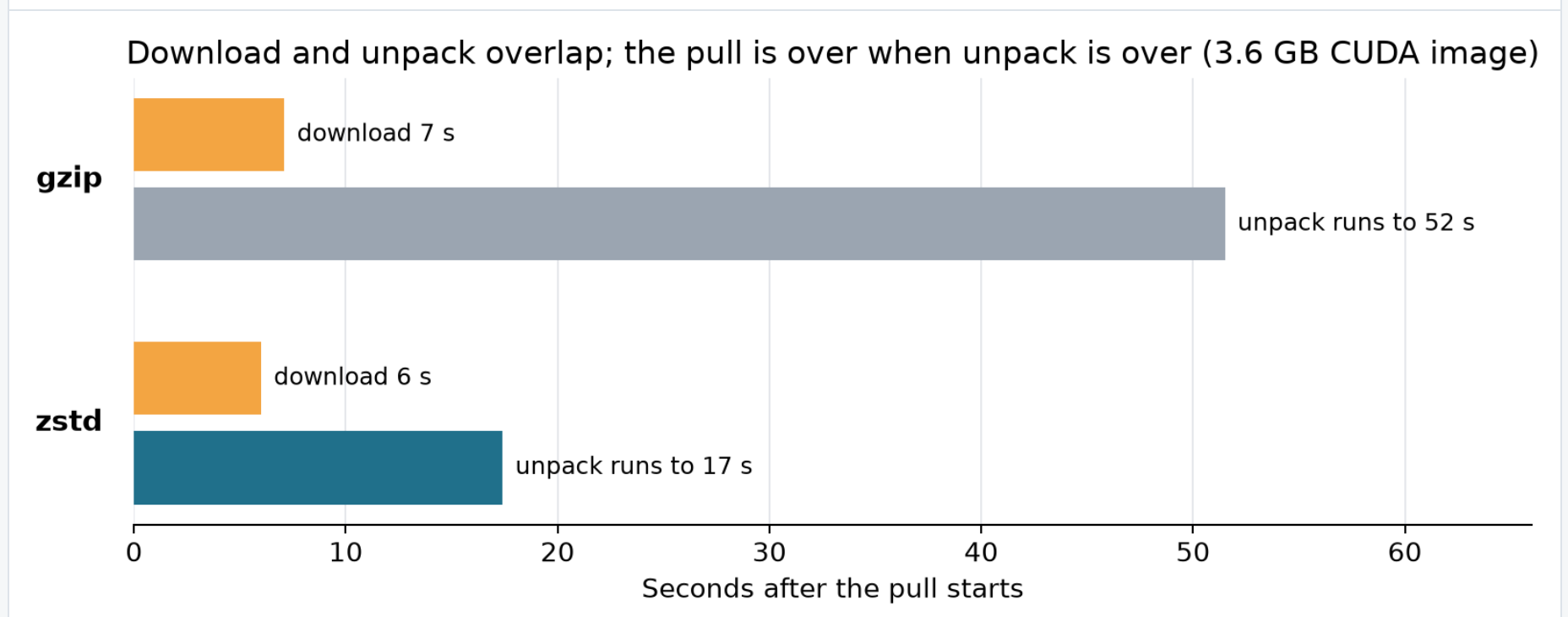
Pulling a 3.6 GB NVIDIA CUDA® image from a registry in the same region took 51.5 seconds. Pulling it from NVIDIA's public registry over the internet took 56.2 seconds. Moving the registry next door saved 8%. The bottleneck was gzip. Converting that image to zstd cut the pull to 17.4 seconds. On a 24.3 GB NVIDIA NeMo™ image the same change saved 4 minutes per node. On an 8-GPU node, that is 32 GPU-minutes of idle accelerators every cold start.
Key results at a glance
- Raw decompression: 7.2× faster than gzip (681 vs 95 MB/s)
- Cold image pulls: 2.4–3.0× faster across 3.6–24.3 GB images
- Kubernetes pod startup: 2.2–2.4× faster
- CPU consumed per pull: ~4× less
- Image size: ~18% smaller
- Changes required on nodes: none (containerd version 1.5.0 or newer)
Where image pull time goes
A pull has three phases: resolve the manifest, download the compressed layers, and unpack them, which means decompressing each layer and writing it to disk. Download and unpack overlap, and unpack is the long pole. In our measurements on 7 GB and 13 GB images, unpack accounted for about 80% of total pull time, and containerd unpacks layers one at a time by default. Many public container images are compressed with gzip, a format from the early 1990s, and decompressing them is what makes unpack slow.
While choosing physically closer registries and peer-to-peer distribution, both shorten the download phase, optimizing the unpacking phase is crucial to achieving a highly performant image pull.
Why zstd is different
Zstandard (zstd) was released in 2016 and is standardized in RFC 8878. It is similar to gzip's DEFLATE algorithm (RFC 1951) but was designed for current CPUs. Two differences matter for image pulls. First, its decoder works on several streams at once within a single core, whereas DEFLATE decodes one symbol at a time with each depending on the last. Secondly, its match window can be several megabytes (rather than fixed at 32 KB), so it finds repetition across a whole layer instead of within a small slice of it, which is also why zstd images are smaller. The result is decompression several times faster than gzip at a similar or better compression ratio.
zstd has become widely supported in the containerization field. For example, containerd has unpacked zstd layers natively since v1.5.0 (May 2021).
First benchmark: decompression throughput alone
First, we compared how the two algorithms decompressed the same 512 MB sample, using each format's standard CLI tool on a 20-core node.
Note: gzip and zstd have configurable levels which determine their sliding “memory windows” for pattern-matching. We swept through a few common levels and found that decompression remained relatively flat; the levels mostly improve compression time. Therefore, we kept the tools’ defaults (gzip 6, zstd 3).
Second benchmark: pulling images
Next, we benchmarked the full containerd pulls (download + unpack) on an NVMe-backed Crusoe Managed Kubernetes node from Crusoe Container Registry in the same region. Below are the findings averaged across three trials (and yes, we cleared all caches between each).
Result. The 24.3 GB image pull drops from about 6.5 minutes to about 2.5 minutes, and the 7 GB TensorRT image, a typical inference container image, from 2 minutes to 40 seconds.
Third benchmark: Kubernetes pod startup
Finally, we zoomed out to what customers actually come to Crusoe to do: run workloads. We scheduled fresh pods, where the image was not present on the node, and measured wall clock from pod creation to the container running, with the same cache-eviction discipline between runs.
Result. Across images, pod startup was 2.2–2.4× faster with zstd images than with gzip. That is a bit less than the 2.4–3.0× we saw for the pull alone, because pod startup also includes scheduling, sandbox setup and container start, which take the same time with either format. For autoscaled workloads, pull time is startup time: a fine-tuning job starts sooner and an inference endpoint scales out sooner.
CPU cost
An added benefit of zstd was less total CPU consumed while decompressing the same data volume.
This matters most when a node joins a cluster: every DaemonSet and scheduled pod pulls its image at the same time, and with gzip each unpack holds a core at 100% for the whole pull. zstd does the same work in a quarter of the CPU time, so there is less contention while the node comes up.
You've switched to zstd. What next?
Stacking with containerd tuning
We decided to optimize further. Containerd, the container runtime we use in Crusoe Managed Kubernetes, also has settings for image pulls, independent of compression format.
Method. Compression format and containerd's pull concurrency are independent levers, so we measured each alone and both together. Same cold-pull discipline as above, on 20-core NVMe-backed nodes running containerd 2.2, median of 3 runs per configuration. First we raised max_concurrent_downloads alone, with unpack settings at their defaults. Then we swept max_concurrent_unpacks, new in containerd 2.2, and the layer fetch buffer. All three are set in containerd's transfer service configuration ([plugins.'io.containerd.transfer.v1.local']); set elsewhere, the unpack setting is ignored.
Result. Raising downloads alone changed nothing, because layers unpack one at a time behind the downloads: max_concurrent_unpacks defaults to 1 and does not exist before containerd 2.2. Unpack concurrency is the lever that moves: 8 downloads / 8 unpacks cut a 7.4 GB zstd image's cold pull from 82 s to 28 s (2.9×). The two levers compound, because zstd shrinks the work each layer costs while parallel unpack spreads that work across cores. On a 13 GB image, same content in both formats:
Push performance
Method. Push the same freshly staged, uncompressed image to the registry as gzip and as zstd, cold both times, with unique layer digests so the registry cannot deduplicate.
Result. zstd pushes take about 10 seconds longer with skopeo. The difference is the encoder: the Go zstd implementation inside skopeo and BuildKit compresses at ~180 MB/s, while the native zstd CLI reaches ~620 MB/s on the same data, so for bulk conversions compressing layers with the native CLI and pushing the pre-compressed blobs cuts the compression step about 3.4×. Either way, compression is a one-time cost per image version, while the pull savings repeat on every node.
Compatibility
zstd images work on any node running containerd 1.5.0 or newer, which every current Kubernetes distribution ships. The layer's media type in the manifest tells containerd what to do; no node changes or configuration are needed. Two older tools unpack layers with their own decoders and gained zstd support later:
- Docker before v23 with the classic storage driver downloads zstd layers, then fails with an invalid tar header error.
- Slurm with Pyxis/enroot needs enroot 4.0.0 or newer; older versions fail at import. Pyxis itself doesn't care, since it delegates image handling to enroot.
One more caveat: pull-through caches can't convert images for you. A cache must serve upstream bytes unchanged, because recompressing a layer would change its digest and break signatures. It serves zstd only when the upstream image already is zstd, so for upstream images you don't control, you can convert them once into your own repository to get its benefits.
How to adopt zstd
Option 1: If you own the build pipeline, build zstd images directly. One flag in BuildKit:
docker buildx build --output type=image,compression=zstd,compression-level=3,force-compression=true,push=true -t <your-registry>/<image>:<tag> .Option 2: Convert an existing image (no build changes needed):
skopeo copy --dest-compress-format zstd --dest-compress-level 3 --dest-force-compress-format docker://<source-image> docker://<your-registry>/<image>:<tag>-zstdThe --dest-force-compress-format flag is required: without it, skopeo silently reuses the original gzip layers and no conversion happens. Converting a 7 GB image took about 4 minutes end to end in our tests.
Verify the conversion:
skopeo inspect --raw docker://<your-registry>/<image>:<tag>-zstd | jq '[.layers[].mediaType] | unique'Expected output: ["application/vnd.oci.image.layer.v1.tar+zstd"]
Then point workloads at the new tag. Conversion produces a new manifest and new layer digests, so anything tied to the old digest needs updating: digest pins in your manifests, image signatures (re-sign the converted image), and admission policies that allow-list digests. Nodes see it as a new image, so nothing needs clearing from caches.
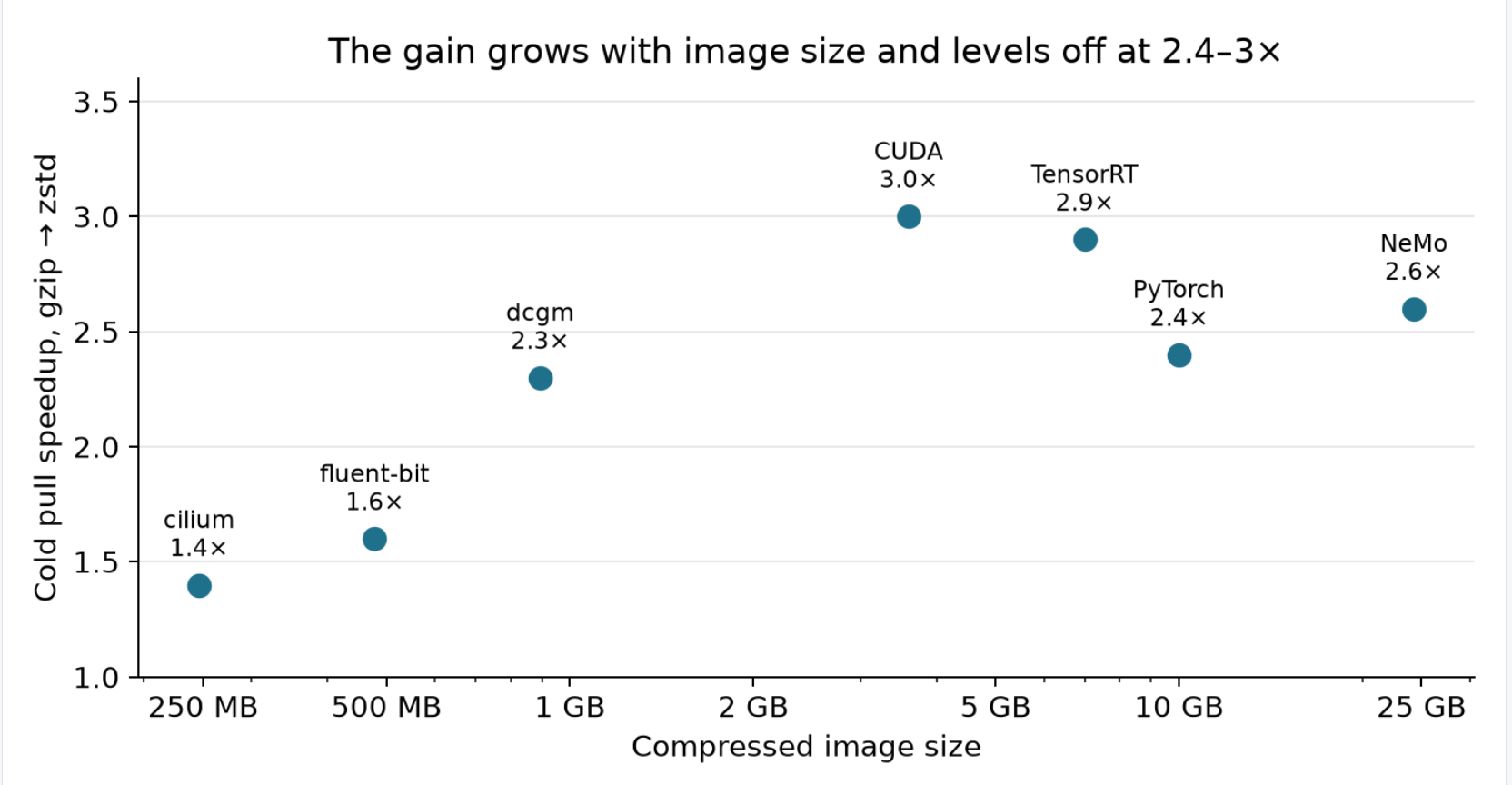
The gain grows with image size: roughly 1.4× at 250 MB, 1.6× at 500 MB, 2.3× at 900 MB, and 2–3× from a few gigabytes up. Below about 100 MB, pull time is mostly fixed overhead.
Summary and recommendation
For workloads pulling multi-gigabyte images, the compression format is the largest single pull-time win we measured: 7× faster raw decompression, 2.4–3.0× faster cold pulls, ~4× less CPU per pull, ~18% smaller images, for one conversion command per image and no infrastructure changes. It stacks with everything on the download side, from closer registries and peer-to-peer distribution to image streaming, because those shorten the first half of the pull and zstd shortens the second.
Customers on Crusoe Cloud can start today: convert your largest images to zstd in your Crusoe Container Registry repository and point your workloads at the new tags. Your nodes already support it.
Frequently
asked questions
Is zstd better than gzip?
For decompression speed, zstd is better than gzip. In Crusoe’s benchmarks, zstd decompressed a 512 MB sample 7.2× faster (681 vs. 95 MB/s), and full images were about 18% smaller. On a Crusoe Managed Kubernetes node, cold container image pulls were 2.4–3.0× faster.
Why is zstd so good?
Zstandard (zstd) decompresses quickly because its decoder was designed for modern CPUs. It decodes several streams at once within a single core, while gzip’s DEFLATE algorithm decodes one symbol at a time, each depending on the last. Its match window can also reach several megabytes, compared with gzip’s fixed 32 KB, which lets it find repetition across far more data.
What is the default compression level for zstd?
The zstd command-line tool uses compression level 3 by default, on a standard scale of 1 to 19 (up to 22 with --ultra). In Crusoe’s tests, zstd decompression was flat from level 3 to 10 and about 30% slower at 19. Higher levels produce smaller files but take longer to compress, so the level mainly affects build time and image size, not decompression speed.
Does Kubernetes support zstd container images?
Kubernetes nodes that run containerd 1.5.0 or newer can pull zstd container images natively; containerd added zstd layer support in May 2021. The layer’s media type in the image manifest tells containerd the layer is zstd, so no node changes or configuration are needed. In Crusoe’s tests, Docker 20.10 with the classic storage driver downloaded zstd layers but then failed with an invalid tar header error.