Getting started with Crusoe Managed MLflow
Crusoe Managed MLflow is now in private preview. This walkthrough creates a workspace, points the MLflow SDK at it, traces a single LLM call and a LangChain chain on Crusoe-hosted models, and evaluates outputs with a Python scorer and an LLM judge.

.jpeg)




Last week we launched Crusoe Managed MLflow in private preview: a fully managed MLflow on Crusoe Cloud for tracking experiments, tracing LLM applications and agents, and evaluating them with LLM judges, through the standard open-source MLflow SDK and UI, authenticated with a Crusoe API key.
As teams move open-source models and AI agents from experimentation into production, they need to track what was tried, observe how the application behaves, and measure whether a change improved performance. Doing that consistently from prototype to production is hard. Root causes take too long to find, and too much engineering time goes into integrating tracking, observability, and evaluation tools instead of improving the models and applications those tools exist to serve. Managed MLflow brings those capabilities to Crusoe Cloud, next to the services that train and serve your models. It joins Crusoe Managed Inference, Crusoe Serverless Fine-Tuning and Crusoe Managed Reinforcement Learning and together they cover the full lifecycle of an open model on one platform: post-train it, evaluate it against the base model, serve it, observe it under real traffic, and turn those observations into the data for the next training run.
In this post we will set up a workspace, point the MLflow SDK at it, and then trace an LLM call, trace an application built on your favorite open-source agent framework, and score outputs with a Python scorer and an LLM judge. Before the setup and the code, a short introduction to MLflow for anyone who has not worked with it before.
Introduction to MLflow
MLflow is the largest open-source AI engineering platform for agents and LLMs, and the de facto standard for managing the ML lifecycle. It started out as an experiment tracking tool for classic machine learning, adding a Model Registry to version the artifacts those runs produced. As applications evolved from single models to complex LLMs and agents, MLflow matured alongside them into a comprehensive platform for debugging, evaluating, monitoring, and improving production AI applications. It has been a Linux Foundation project since 2020, ensuring open governance and vendor neutrality. For LLMs and agents, it offers:
- Tracing: every prompt, retrieval and tool call in a request, recorded as a tree of spans with latency and token usage. OpenTelemetry-compatible, with more than 100 framework and provider integrations, usually one autolog call away.
- Evaluation and LLM judges: prebuilt and custom judges that score outputs, so every change is measured against the last one with the same criteria.
- Prompt registry: versioned prompt templates with aliases, so promoting a prompt is a registry change rather than a code change, plus prompt optimization driven by data.
- Evaluation datasets and human feedback: real traffic and expert review turned into test sets and labels.
- AI Gateway: one endpoint in front of many model providers, for access, routing, and cost control.
- Version tracking and the MCP registry: an application version tied to its code, configuration, traces and evaluation results, and the same for the tools an agent may call.
Together, these capabilities answer the three critical questions every team asks once a model or agent hits production: What was tried? What happened? Is it still working? All of this is captured in a single, queryable record. Because the platform is open-source, that record remains entirely portable.
How Managed MLflow fits
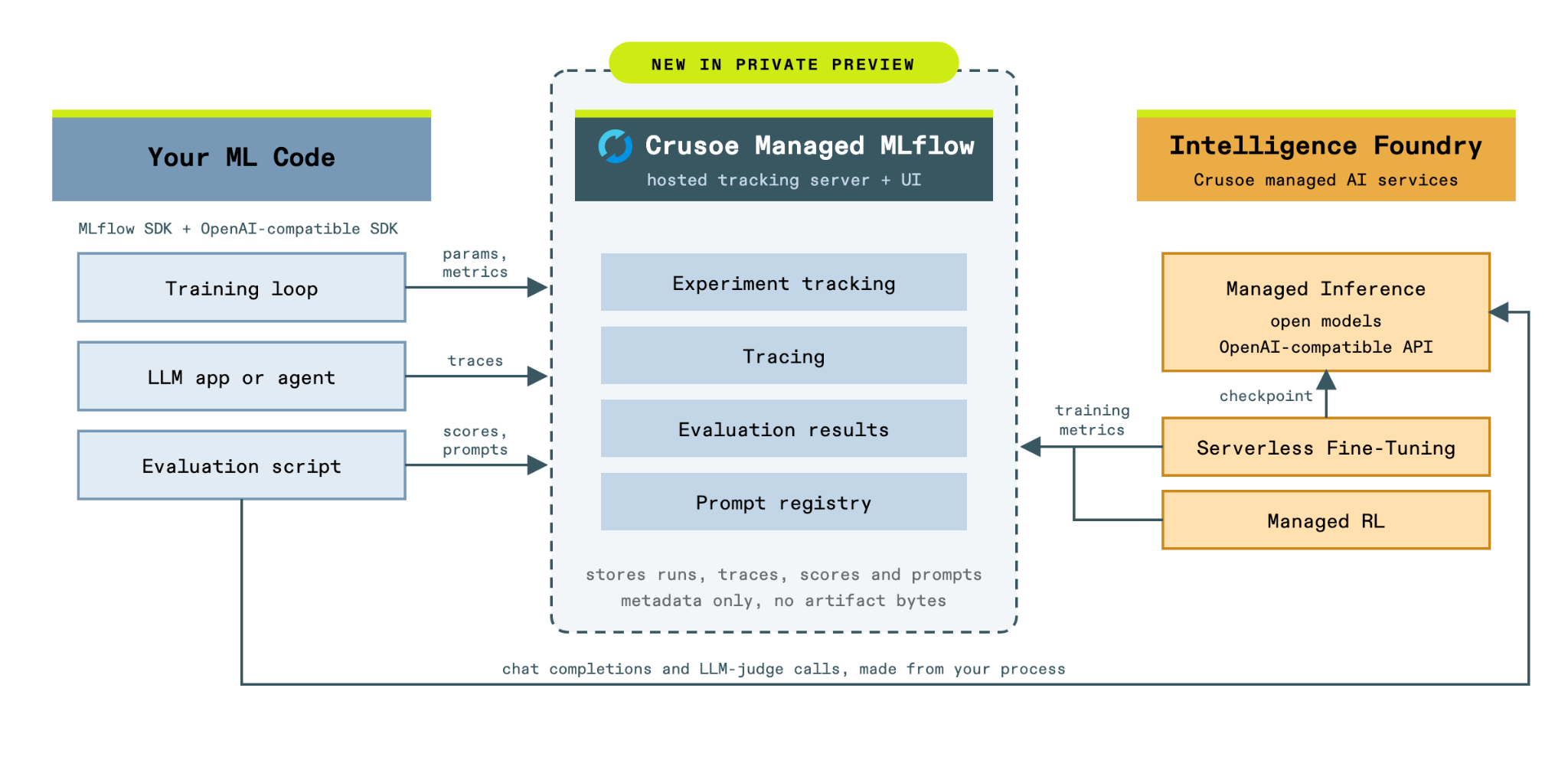
Before a model or an agent reaches your users, you need to prove that it works. Once it is live, you need to see what it actually does, which requests it gets wrong, and which of those should become the next round of training data. On Crusoe Cloud, Serverless Fine-Tuning and Crusoe Managed Reinforcement Learning (RL), which also entered private preview last week, produce model checkpoints, and Managed Inference serves them. Managed MLflow is the layer in between: it compares a new checkpoint against the base model on the same evaluation set, records what the model or agent does under real traffic, and turns the requests that went wrong into evaluation and training data for the next run. There is no separate tracking server to operate and no second set of tools to stitch together.
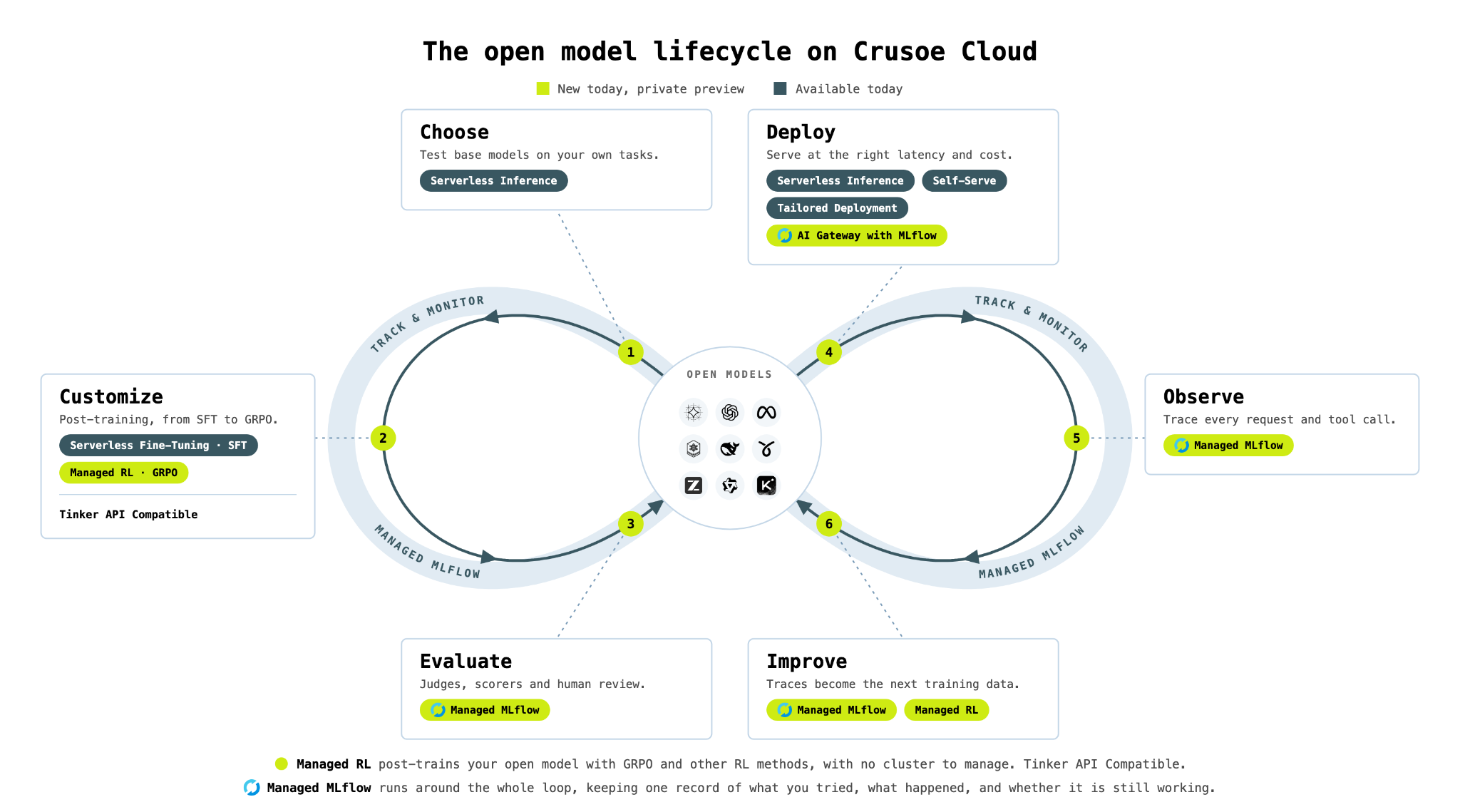
Managed MLflow is the same upstream, open-source MLflow, already deployed and operated by Crusoe on the same infrastructure that trains and serves your models, so there is nothing to install or host on your side. You use the standard MLflow SDK, APIs, and UI, and we run the server, the database, the upgrades, and the patching. The private preview covers experiment tracking, tracing, evaluation, the prompt registry and human review, with the AI Gateway alongside them and Crusoe-hosted models available as a provider.
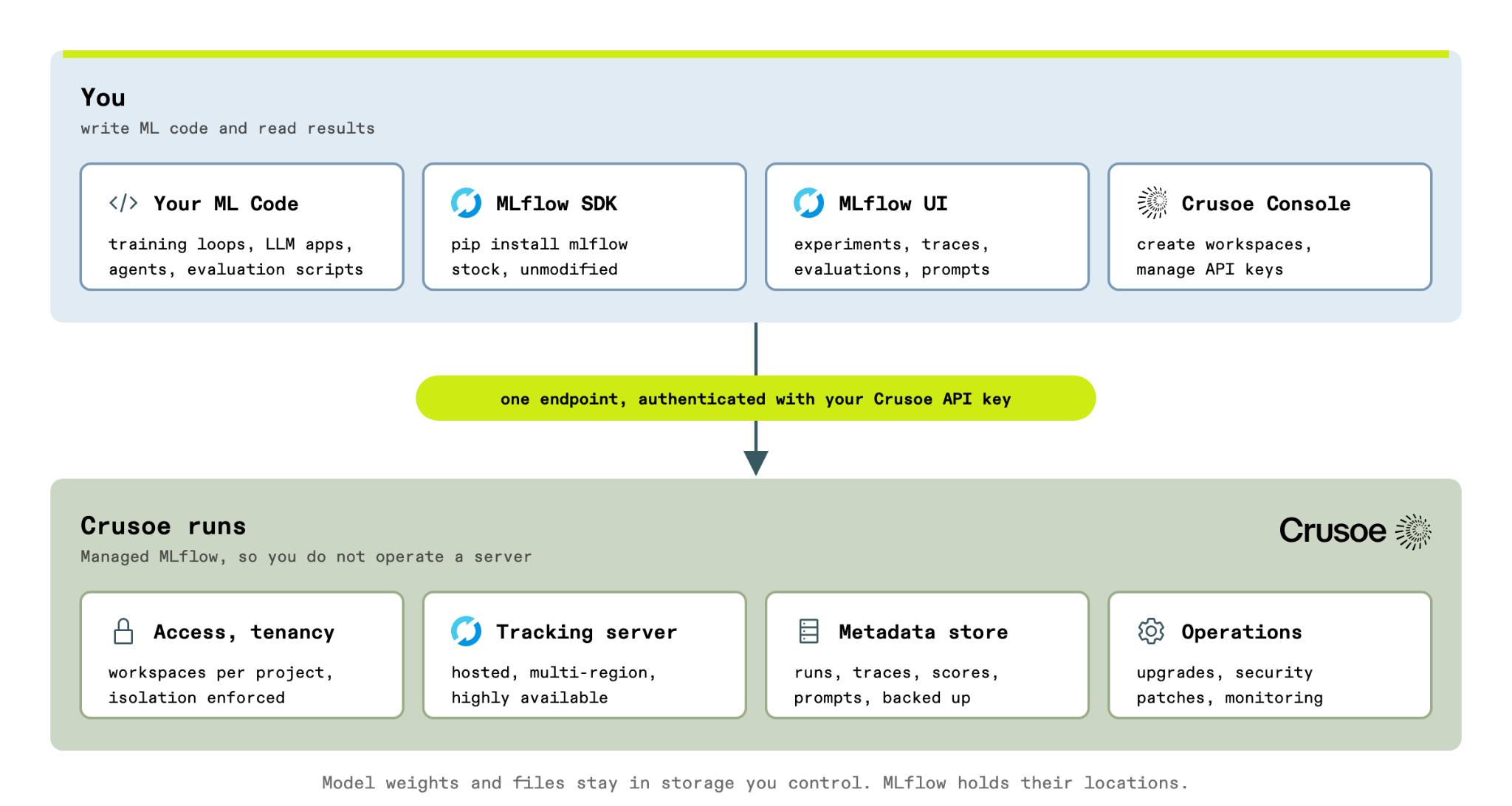
Three properties of the managed service shape how you use it.
Your code does the work: The MLflow SDK, your model calls, judges and scorers all run in your process, and the service stores what the SDK sends it. Nothing you write executes on our servers, which is why server-side evaluation jobs are not part of the preview.
Metadata, not bytes: The service holds runs, metrics, traces, scores and prompts. Model weights and files stay in your own storage, and you log their location as a parameter or a tag; log_artifact with files is the one habit to change.
Workspaces are the boundary: A Crusoe project can hold multiple MLflow workspaces, each fully isolated from the others, so you can keep one per team, model line or environment. You authenticate with the API key you already use for model calls, so there is no separate MLflow credential to manage.
Step 1: Create a workspace and an experiment
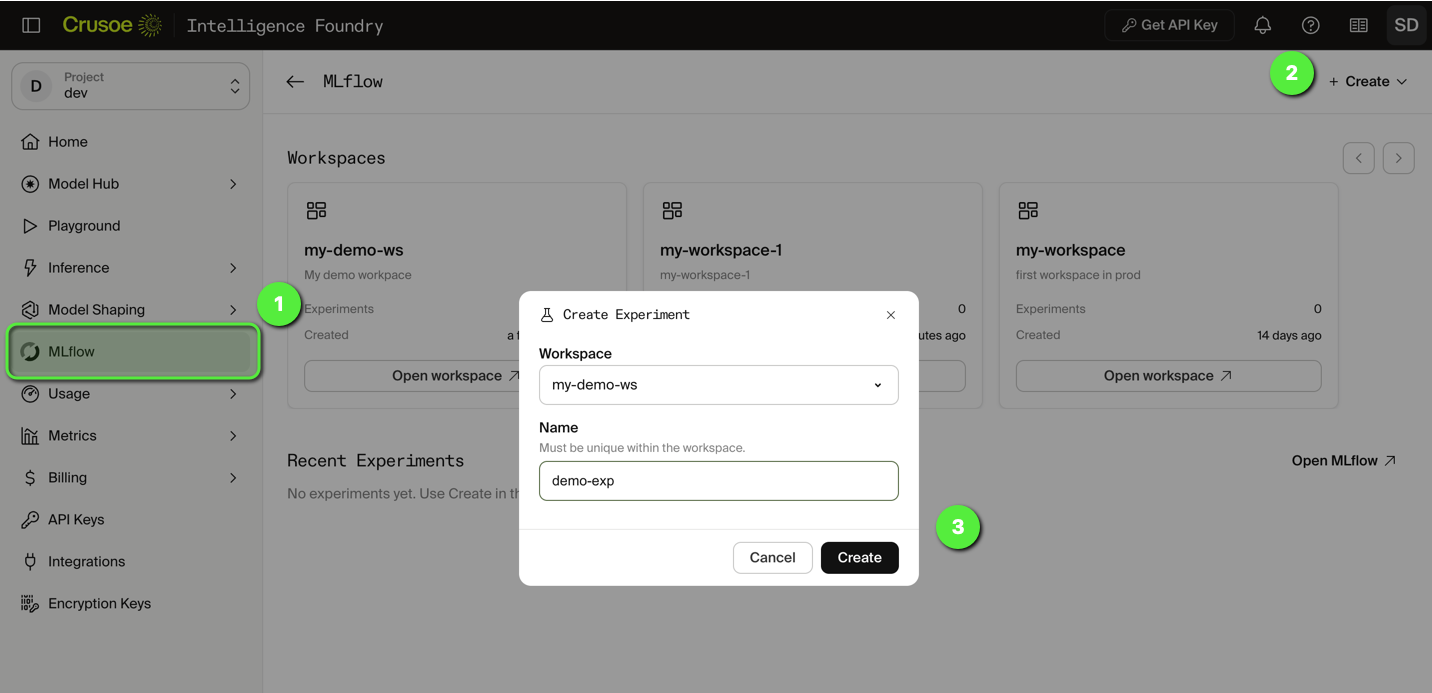
Open the Crusoe Console. Under MLflow, create a workspace and give it a descriptive name. The name appears throughout the MLflow UI and in your configuration.
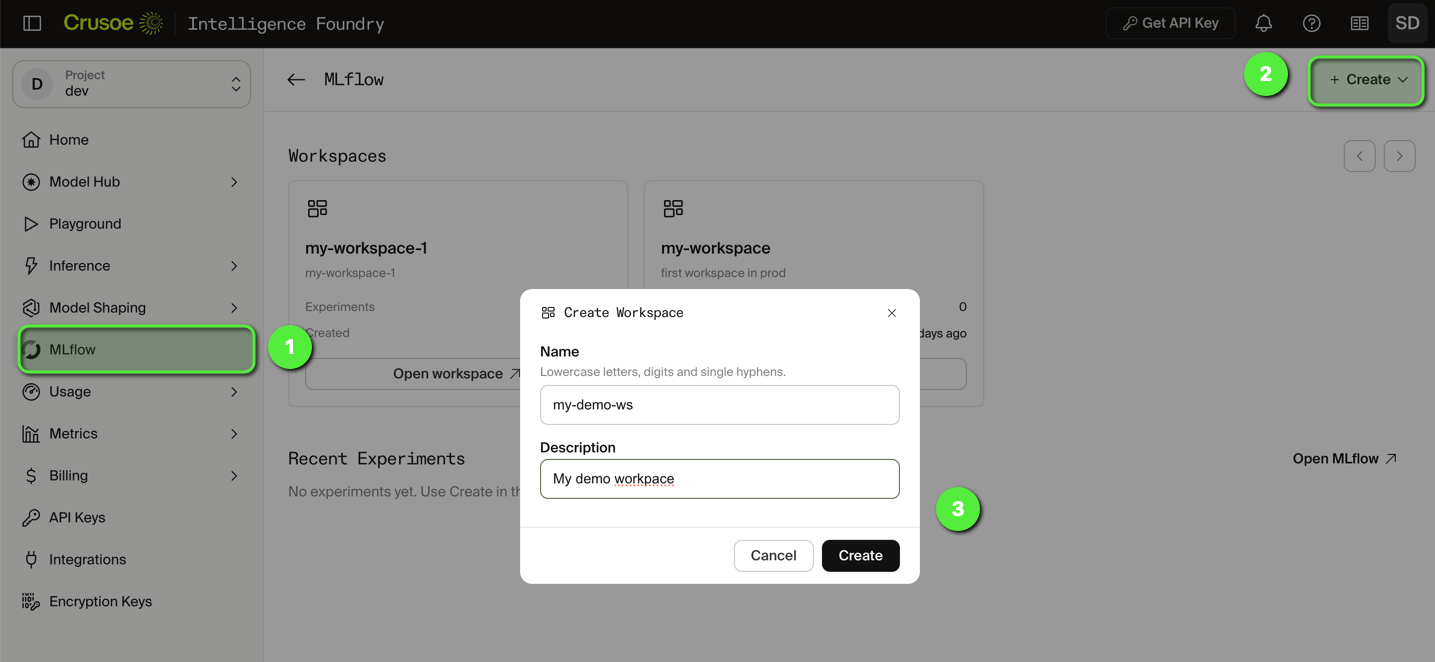
Then create an Experiment.
Step 2: Create a Crusoe API key
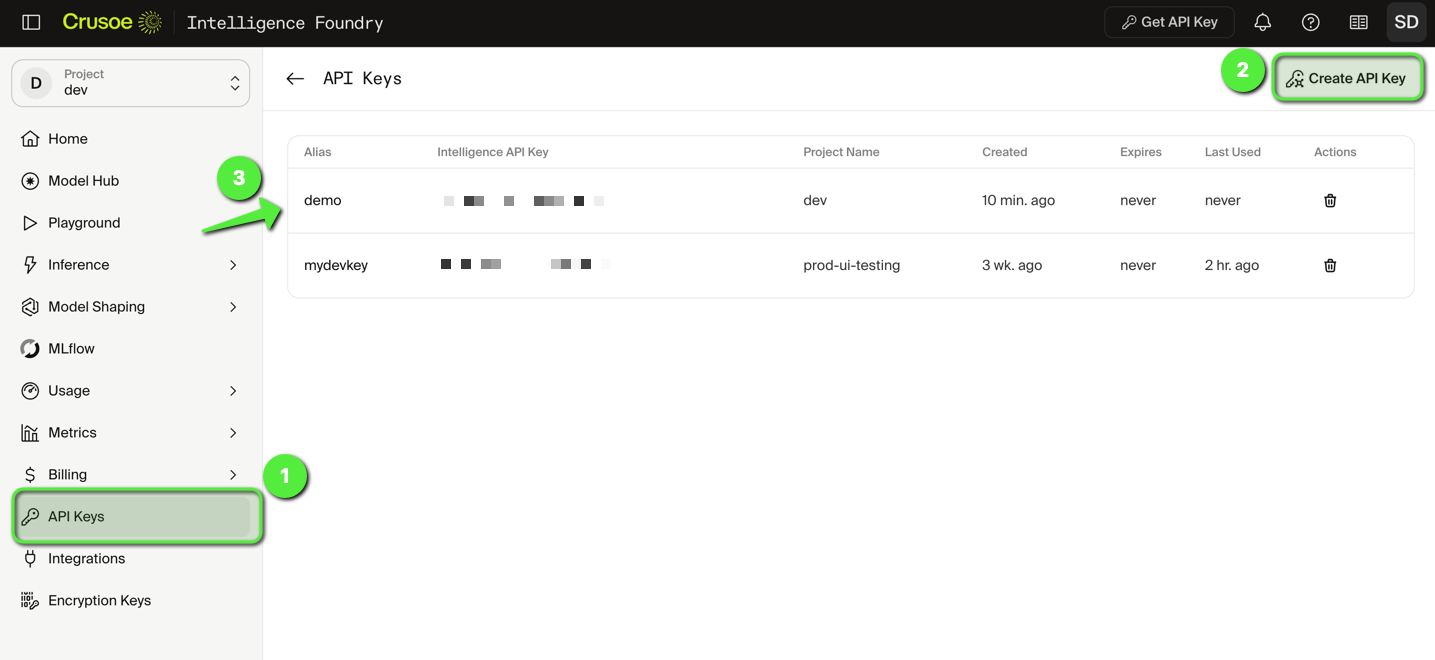
Create an API key under API Keys in the Console, if you do not have one already. The same key authenticates MLflow and Managed Inference.
Step 3: Set up the SDK
Every example in this post lives in the Crusoe Developer Hub repository, with a .env template. Clone it and move into the cookbook:
Install the dependencies with uv and create your .env from the template. Managed Inference is OpenAI-compatible, so the OpenAI SDK works as is for your own model calls, and LiteLLM's Crusoe provider lets MLflow's judges reach Crusoe-hosted models.
Fill in .env with your workspace, experiment, API key and model:
That is the complete client-side configuration. MLflow reads the tracking URI, token and workspace from the environment, and the SDK sends the token as a bearer header on every request. Any model from the available models list works in CRUSOE_MODEL.
Step 4: Run your first examples
With the workspace created and the SDK configured, everything in the capability list above is available through the same SDK and the same workspace. The three examples below cover tracing a single LLM call, tracing an application built on an agent framework, and evaluating outputs with a scorer and a judge. Each one is a short script you can run as is and then adapt to your own application.
Trace an LLM call
The smallest useful program is a single chat completion against a Crusoe-hosted model with tracing enabled. mlflow.openai.autolog() patches the OpenAI client so that every call through it becomes a trace with inputs, outputs, latency and token usage, without any change to the application code.
Run the script:
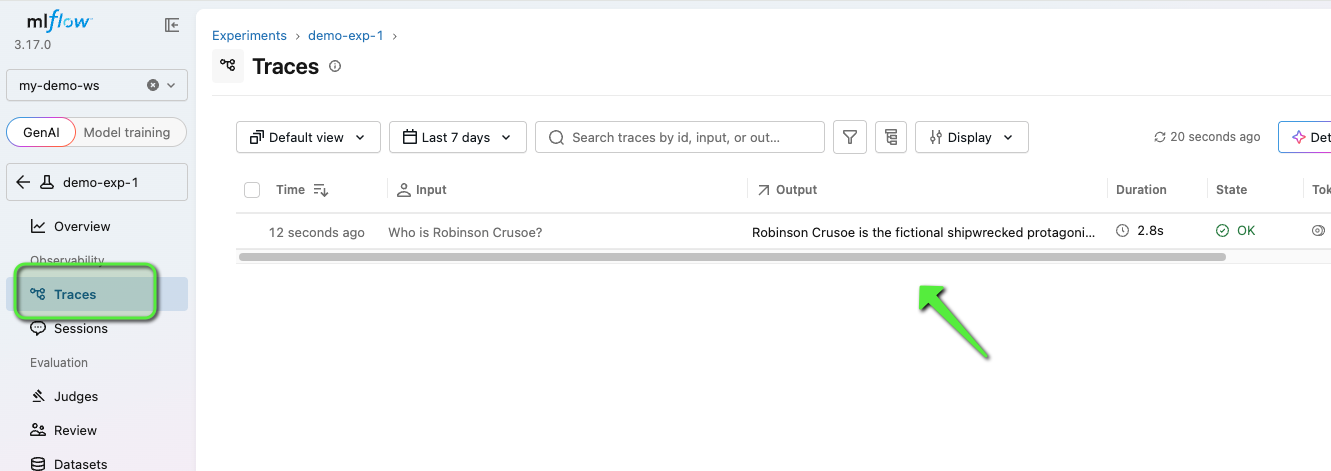
And then open the MLflow UI from the Console, select your workspace and the experiment, and the trace appears under the Traces tab, as shown below:
While autolog captures the model call on its own, production applications require broader context. A typical request handler validates inputs, builds prompts, and formats outputs. You want your trace to cover that entire handler, capturing user, session, and environment metadata so individual requests remain easy to locate later.
Decorating the handler with @mlflow.trace creates a parent span for the request, and the autologged model call becomes a child span under it. Calling mlflow.update_current_trace inside the handler lets you record the user and session as trace metadata, which the MLflow UI uses to group traces by session, while attaching tags like environment and outcome for easy filtering in the UI or via search_traces.
With those tags in place, a support engineer can retrieve every trace for a given session, and whoever is on call can filter to every failed request from the last hour, which is what makes a trace useful after the fact rather than only while debugging. In the repo this is 01_tracing_v2.py, where ask() wraps the chat completion from the first script.
Run the script:
The trace now has two spans, handle_user_request as the parent and the autologged model call under it, with the user and session in the trace metadata.
Trace an agent framework
Most teams do not call the model directly. They build on LangChain, LangGraph, the OpenAI Agents SDK, PydanticAI, LiteLLM or one of the other frameworks MLflow integrates with. The pattern remains consistent across all of them: a single autolog call transforms the framework's internal steps into clean, nested spans within a unified trace.
Here is a LangChain chain running on Crusoe, using the ChatCrusoe model class from the langchain-crusoe package. Calling mlflow.langchain.autolog() automatically captures and records the prompt template, the model call, and the output parser as part of the trace.
Run the script:
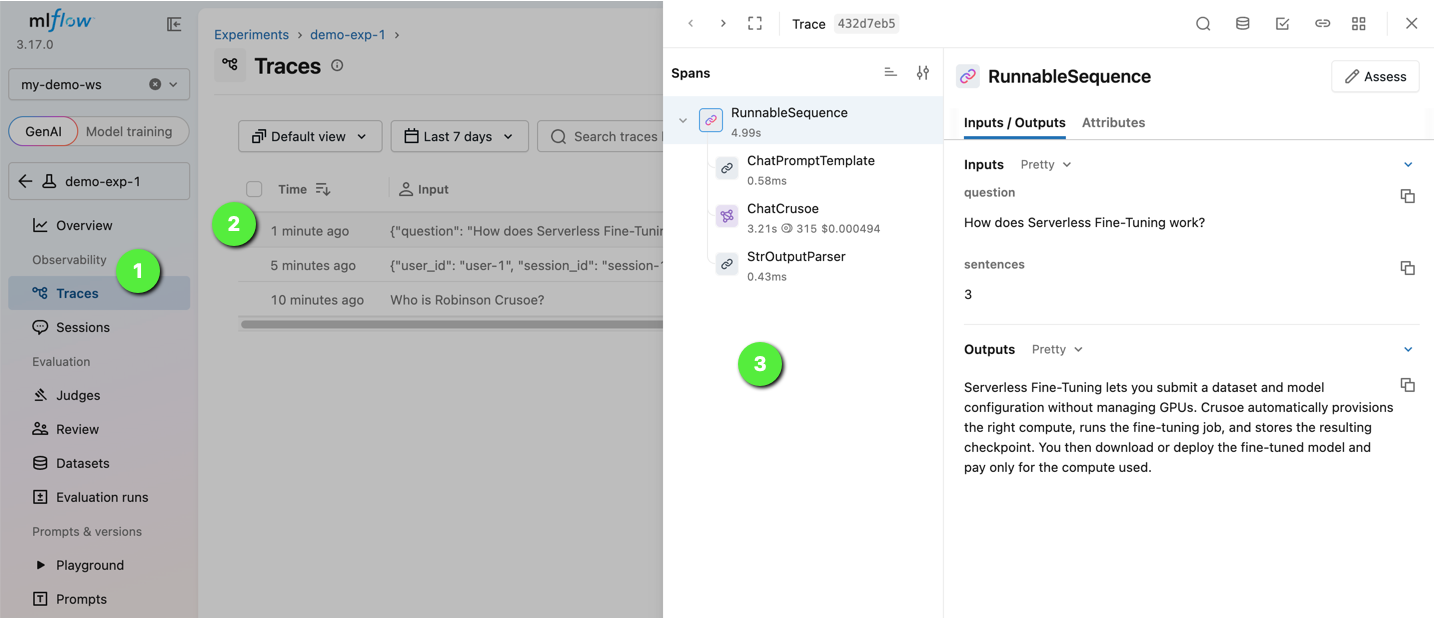
Open the trace from the Traces tab to view the execution summary: input parameters, the exact system and user messages sent to ChatCrusoe, the assistant's answer, and total token usage and latency.
Evaluate with a scorer and a judge
Tracing shows what the application did on each request. Evaluation answers a different question, whether the outputs are acceptable, and answers it across a whole dataset so that the result is repeatable and comparable between versions. mlflow.genai.evaluate() takes your application and a dataset, runs every row through it, and scores each output with the scorers you choose, which can be plain Python functions, MLflow's built-in LLM judges, or a mix of both.
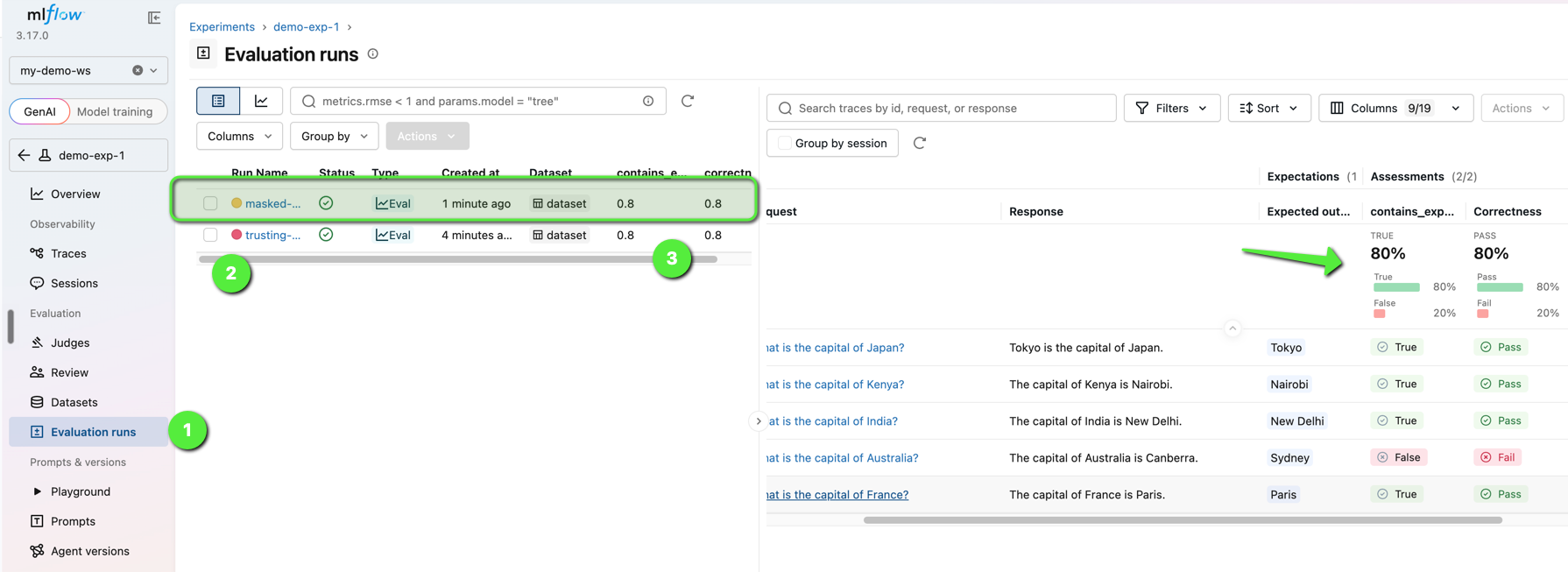
The example below evaluates a small question-answering app, a single chat completion on a Crusoe-hosted model, in two ways: contains_expected is a deterministic check, and Correctness is a built-in judge whose model is also Crusoe-hosted, addressed as crusoe:/<model> through LiteLLM's Crusoe provider. The model under test and the judge both run on Crusoe, and the results land in your workspace. The app function is the part you replace with your own entry point.
Run the script:
mlflow.genai.evaluate() sends each of the five questions through the app, then scores every answer twice: contains_expected checks for the expected city, and the Correctness judge reads the question, the answer and the expectation and gives a verdict with a rationale. The last row expects Sydney, which is wrong on purpose. The model answers Canberra, so the deterministic check fails and the judge marks the answer incorrect against the stated expectation. Four of the five rows pass, and both means come back at 0.8. In the UI, the Evaluation tab shows the run, each row's output, and the judge's rationale for every score, as shown below:
This same script doubles as a regression test for production applications. Replace the demo app with your own entry point, supply rows exported from production traces as the dataset, and run the evaluation before each release. When two versions of an application are evaluated against the same dataset, the MLflow UI displays their scores side by side, making the impact of any prompt, model or retrieval change visible in the metrics.
Closing the loop
These examples represent just a fraction of what an MLflow workspace can manage. The preview includes considerably more of MLflow, all through the same SDK and workspace:
- Prompt registry: version prompts and promote them by alias, without a code change.
- Evaluation datasets and human feedback: build test sets from collected traces, with reviewer labels where a judge is not enough.
- AI Gateway: one endpoint for your application, with Crusoe-hosted models as a provider.
- Experiment tracking: parameters and metrics for any training run, on Crusoe or elsewhere.
Traces identify the exact requests where a model falls short. Datasets built from those traces become the test sets and training data for the next Serverless Fine-Tuning or Managed RL run. The resulting checkpoint is then evaluated within the same experiment and promoted once it outperforms the baseline.
Get started
Managed MLflow is in private preview, and there is no charge for it during the preview period. We are working closely with early teams to shape it, and we would like to hear what you build.
- Request access: Crusoe Managed MLflow private preview
- Code samples: Crusoe Developer Hub
- Join the community: ask questions and share what you are building on the Crusoe Discord
- Read the docs: the MLflow GenAI guide covers everything above in depth, and Crusoe for Developers has the rest of the platform.
Frequently
asked questions
What are the differences between open source and hosted MLflow?
Hosted MLflow is the same open-source MLflow with the server, database, upgrades, and patching run by a provider instead of your own team. Crusoe Managed MLflow runs upstream MLflow on Crusoe Cloud and works with the standard MLflow SDK, APIs, and UI, so there is nothing to install or host. Your code, model calls, judges, and scorers still run in your own process, and the service stores what the SDK sends it.
What is MLflow tracing?
MLflow tracing records every prompt, retrieval, and tool call in a request as a tree of spans, with latency and token usage. It is OpenTelemetry-compatible and covers more than 100 framework and provider integrations, usually enabled with a single autolog call and no change to application code. A decorator on a request handler adds a parent span, and user and session metadata let you retrieve every trace for a session later.
How does an LLM judge work?
An LLM judge is a model that scores another model’s outputs against defined criteria. In MLflow, a built-in judge such as Correctness reads each question, the application’s answer, and the expected response, then returns a verdict with a written rationale. mlflow.genai.evaluate() runs every row of a dataset through the application and applies the judges and any Python scorers you choose, so results are repeatable and comparable between versions.
What are the best practices for an LLM-as-a-judge?
Pair an LLM judge with a deterministic check, such as a Python scorer that tests for an expected value, so every output gets both a verdict and a hard pass or fail. Evaluate each new version against the same dataset so scores are comparable, and build that dataset from production traces where the model fell short. Add human feedback where a judge is not enough.

.jpg)