Faster image pulls at scale: How peer-to-peer image distribution cuts pull times on Crusoe Managed Kubernetes
Peer-to-peer image distribution turns every warm node in a cluster into a registry mirror, so the upstream registry stops being a single point of contention. Spegel does it with one Helm command and no changes to your images or workflows.

Spegel peer-to-peer image distribution cut the network download phase of image pulls by up to 55% on Crusoe Managed Kubernetes. For a 17 GB NVIDIA NeMo image, that translated to roughly 12% faster median pulls and up to 17% lower P99 latency, bringing the slowest nodes in line with the median. This post covers how Spegel, an open-source peer-to-peer distribution layer, reduces pull latency, with benchmark results across three image sizes on a 56-node GPU cluster.
Why image pull performance matters
Container image pulls are one of the first things that happen when a node joins a cluster or a workload scales up. For CPU workloads running lightweight images, the pull is rarely the constraint. For AI and ML workloads on Crusoe Managed Kubernetes (CMK), where container images routinely reach 5–20 GB, it's a different story.
When a cluster scales, every new node needs the same image before it can start running work. The faster the pull of the AI/ML image, the faster you can utilize the GPU. For example, pulling a 17 GB NVIDIA NeMo image takes nearly six minutes per node without any optimization. That time counts against your effective training time ratio (ETTR): the share of wall-clock time your GPUs spend actively computing versus waiting on overhead. For AI/ML workloads specifically, reducing pull latency shortens the gap between a node being provisioned and it actually running your workload, directly improving ETTR.
What Spegel does

Spegel is an open-source, stateless peer-to-peer registry mirror for Kubernetes. It runs as a DaemonSet, one pod per node, and uses a distributed hash table (DHT) to advertise which image layers each node already has. When a node needs to pull an image, it checks whether any peer in the cluster already has the layers it needs. If a peer has them, the pull happens node-to-node over the cluster's private network, a shorter and lower-latency path than a round trip to the upstream registry. If no peer has a given layer, the node falls back to pulling from the upstream registry as usual.
The key design detail is that Spegel operates at the layer level, not the image level. A container image is a stack of layers, and Spegel can serve individual layers from different peers. This means a node doesn't need the full image to start helping: as soon as it finishes pulling its first layers from the registry, it can begin serving those layers to peers that haven't started yet. The result is less time waiting on the registry and more time putting your GPUs to work.
What Spegel speeds up (download vs. unpack)
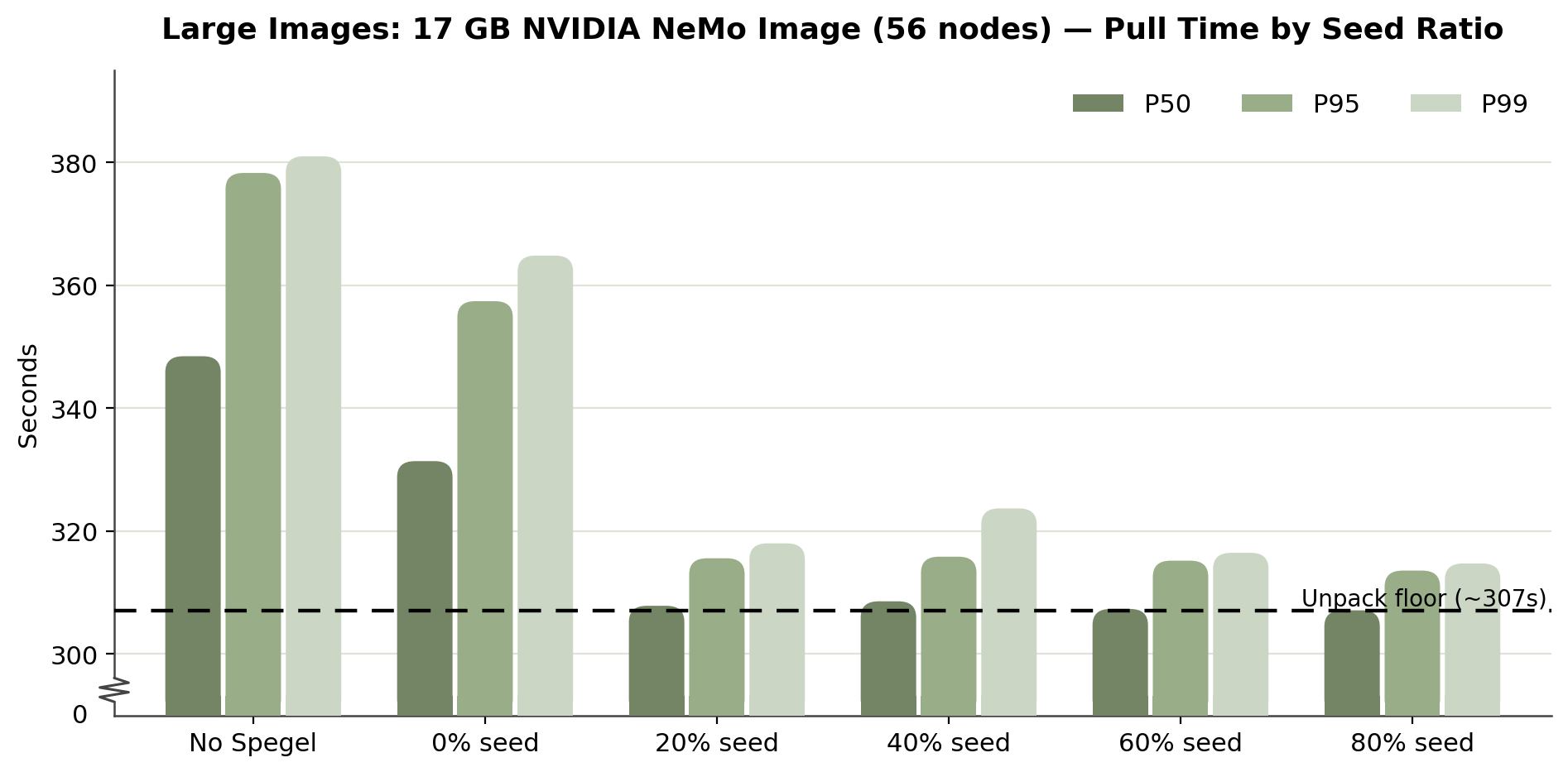
An image pull has two phases: downloading compressed layers over the network, and decompressing and unpacking them onto local disk. Spegel can only accelerate the first phase of the image pull. Unpacking is local CPU and disk work that takes the same time no matter where the layers come from. This matters for reading the results below: end-to-end pull times include that fixed unpack cost, so a large improvement in the download phase shows up as a more modest improvement in total pull time. In our 17 GB benchmark, cluster telemetry showed the download phase dropping from ~165 seconds per pull without Spegel to ~74 seconds when most of the cluster already had the image cached, up to ~55% faster. Since unpacking that image takes roughly five minutes regardless, the theoretical best case for faster downloads was 348.5 seconds down to roughly 307, and Spegel delivered essentially all of it.

How we tested
We benchmarked Spegel on CMK clusters using three image sizes that represent the range of what customers actually run: a 3.5 GB NVIDIA CUDA® image, an 8.5 GB PyTorch image, and a 17 GB NVIDIA NeMo image. All images were pulled from Crusoe Container Registry (CCR) in the same region as the cluster. All three benchmarks ran on 56-node clusters of GPU-enabled VMs, with 10 iterations per configuration. We also validated Spegel's behavior on standard CPU VMs as a supplementary check, though the results reported below are from GPU-enabled nodes.
Peer-to-peer distribution is heavily dependent on the seed ratio: the percentage of nodes that already had the image cached before the pull began. An 80% seed ratio means 80% of nodes had the image and only the remaining 20% needed to pull it. We recommend Spegel for rolling updates, scale-ups, and node replacements, where most of the cluster is already warm and existing nodes act as the seed. Meanwhile, there won’t be much benefit at 0% seed, where every node is cold and pulling a new image at the same time.
Results: faster pulls across three image sizes
Small images: 3.5 GB CUDA image across 56 nodes
At 80% seeding, median pull time dropped from 54.0s to 44.6s (~17%). P99 dropped from 59.3s to 46.9s (~21%). Performance held roughly steady from 20–80% seed, with the biggest jump happening between 0% and 20% seed.

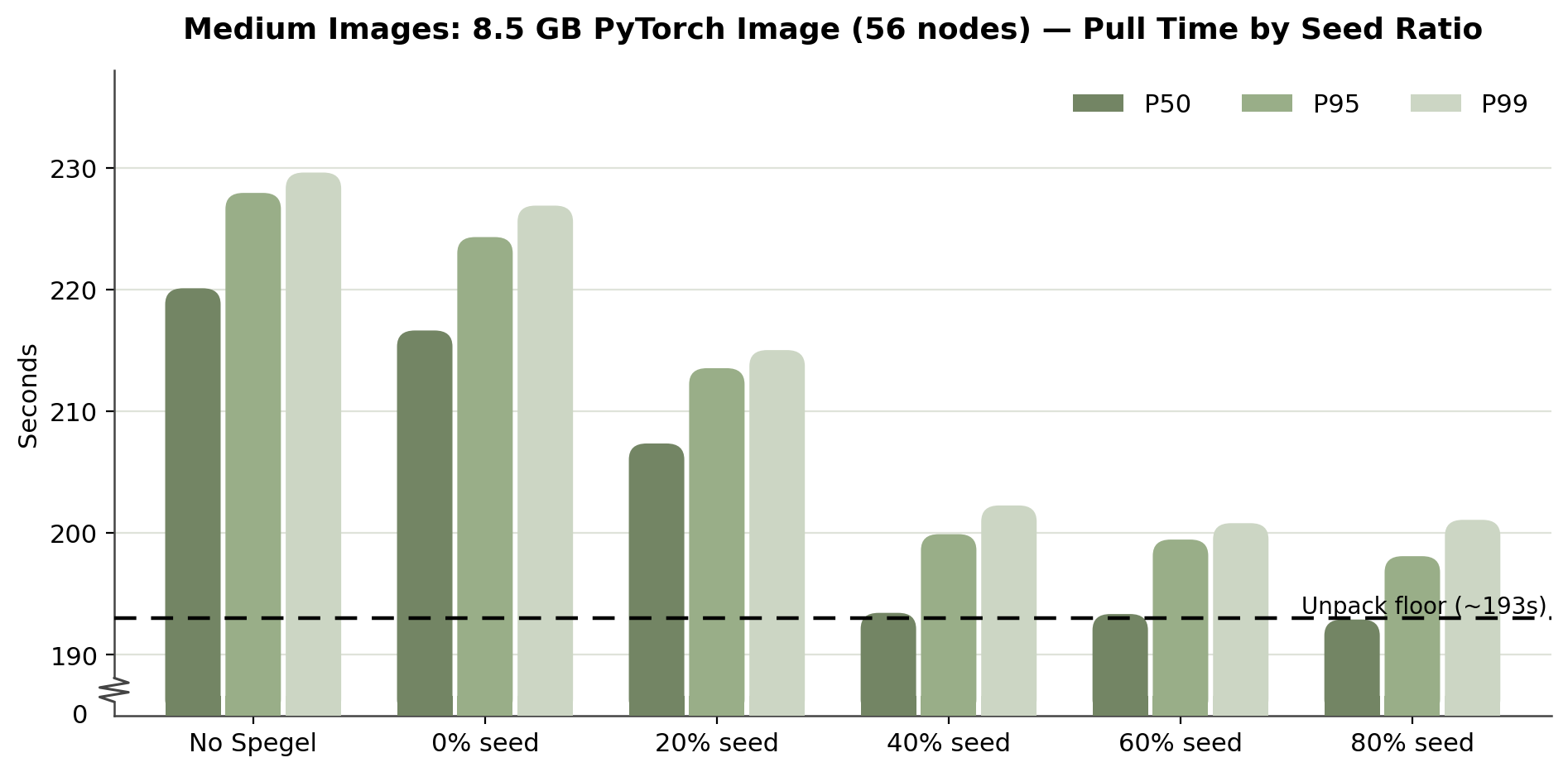
Medium images: 8.5 GB PyTorch image across 56 nodes
At 80% seeding, median pull time dropped from 220.1s to 192.9s (~12%). P99 dropped from 229.6s to 201.1s (~12%). Improvement here stayed flat across 40%, 60%, and 80% seed; all three landed within a couple seconds of each other.
Large images: 17 GB NVIDIA NeMo image across 56 nodes
At 80% seeding, median pull time dropped from 348.5s to 307.1s (~12%). P99 dropped from 381.0s to 314.7s (~17%), a larger absolute tail-latency improvement than either smaller image size. Even at 0% seeding, Spegel still improved median time by roughly 5%, unlike the smallest image, where zero seeding added a slight overhead. Larger images benefit from partial layer-sharing even before any node is fully seeded.
The seed ratio sweet spot
Across all three image sizes, most of Spegel's benefit shows up once roughly 20–40% of nodes already have the image cached. Smaller and larger images saturated closer to 20%, while the medium image needed closer to 40% before flattening out. Beyond that range, additional seeding produced only marginal further gains.
This aligns with how many production clusters scale up. In rolling updates, image scaling events, and node replacements, the majority of the cluster is typically warm. The nodes that need to pull are the minority, and they benefit the most from having a large peer pool to draw from. This applies even to teams iterating rapidly on the same image. Because Spegel shares data at the layer level, nodes running the previous version seed every unchanged layer, so a new tag that touches one layer behaves like a nearly fully-seeded pull rather than a cold pull.
What this means for CMK customers
The practical effect is that workloads start faster, rollouts are more predictable, and the upstream registry stops being a single point of contention during concurrent pulls.
For AI workloads on CMK, the image pull is the last step between provisioning a node and putting it to work. The faster the pull, the sooner the node is training. On this 56-node rollout, for example, even a modest reduction in pull time adds up to meaningful reclaimed compute, and it compounds every time that cluster scales up or replaces nodes. This effect grows with image size for tail latency specifically: the 17 GB image recovered about 66 seconds at P99, versus 28 seconds for the 8.5 GB image and 12 for the 3.5 GB one. Larger images see a bigger cut in worst-case wait time, even though median improvement holds steady around 12% for the two larger images. The pull-time savings translate directly into a higher ETTR: more of your wall-clock time goes to training steps, less to startup overhead.
The time adds up at fleet scale. In our 56-node benchmark, Spegel shaved roughly 40–66 seconds off pull time per node on the 17 GB image. That compounds quickly: a 500-node fleet pulling five times a day returns on the order of 13,000 GPU-hours a year to training, from a DaemonSet that's effectively free to run. Actual gains will depend on fleet size, pull frequency, and image size.
How to try it out
Spegel runs as a lightweight DaemonSet across your cluster; no changes to your application images or existing workflows are required to benefit from peer-to-peer distribution. It's also stateless: no persistent storage needed, since Spegel serves layers directly from containerd's existing image cache on each node.
Crusoe Managed Kubernetes is Spegel-compatible starting with nodepool versions 1.32.7-cmk.31, 1.33.4-cmk.25, 1.34.5-cmk.16, 1.35.5-cmk.14. Enabling it takes a single Helm command:
helm upgrade --create-namespace --namespace spegel --install spegel oci://ghcr.io/spegel-org/helm-charts/spegelAcross our 56-node benchmarks, each pod typically used around 30 MiB of memory and under 10 millicores of CPU, peaking at roughly 175 MiB and 80 millicores during the heaviest concurrent pulls. Those peaks exceed the chart's default 128Mi memory limit, so if you're running large images at high concurrency, install with a higher limit instead:
helm upgrade --create-namespace --namespace spegel --install spegel \
  oci://ghcr.io/spegel-org/helm-charts/spegel \
  --set resources.requests.memory=512Mi \
  --set resources.limits.memory=512Mi
To verify Spegel is running:
kubectl get daemonset -n spegelYou should see the DaemonSet with the desired number matching your node count:
NAME     DESIRED   CURRENT   READY   UP-TO-DATE   AVAILABLE
spegel   56        56        56      56           56

NODE SELECTOR            AGE
kubernetes.io/os=linux   29m
To confirm peer-to-peer transfers are actually happening, and not just that the pods are healthy, port-forward to any Spegel pod and open its debug page:
kubectl --namespace spegel port-forward spegel-ztbql 9090
Forwarding from 127.0.0.1:9090 -> 9090
Forwarding from [::1]:9090 -> 9090
Then navigate to http://localhost:9090/debug/web and check the Last Mirror Success field. Once a peer has served an image, it shows how recently; on a fresh install it reads Pending until the first P2P transfer occurs. This check matters because Spegel falls back to the upstream registry silently by design. Pulls will succeed even if P2P isn't working, which can mask a configuration problem.

That silent fallback is also a feature: if all Spegel pods go down mid-pull, containerd falls back to the upstream registry and the pull completes normally. We validated this by killing every Spegel pod in the cluster during an active 8.5 GB image pull; the pull finished successfully without intervention. Adopting Spegel doesn't introduce a new failure mode. Worst case, you're back to today's default behavior.
You don't need a fully warm cluster to benefit, either. As the results showed, the sweet spot arrives well before full seeding. Most rolling updates and scale-up events already leave a cluster in that zone.
Conclusion
Image pull time is one of the few pieces of GPU infrastructure overhead you can meaningfully cut without changing your workloads, your images, or your registry. In our benchmarks across three image sizes on 56-node CMK clusters, Spegel reduced median pull times by roughly 12–17% and P99 pull latency by up to 21%. The largest absolute tail-latency gains on the largest images, exactly where slow pulls delay training the most. Because the benefit saturates once just 20–40% of nodes are seeded, most real-world scale-ups and rolling updates land in the zone where Spegel is already doing its best work.
Adopting it is a single Helm command, it's stateless, and if anything goes wrong, containerd falls back to pulling from the registry exactly as it does today. If you're running large AI/ML images on Crusoe Managed Kubernetes, it's one of the cheapest ETTR improvements available.
To get started, spin up a CMK cluster on Crusoe Cloud Console, or reach out to our customer support team to talk through your specific training workloads.
.jpg)
.jpg)