Making room for bigger fine-tuning datasets
Crusoe Intelligence Foundry now supports multipart uploads up to 16 GiB. Split a dataset into parts, upload them in parallel with the OpenAI SDK, and Crusoe assembles and verifies one file, ready for fine-tuning. See how it works and how to pick a part size.

.jpeg)


We heard that our customers wanted to train on much larger datasets, and removing the per-upload size ceiling was a requested feature. To make this possible, we introduced a multipart upload capability that integrates into the OpenAI SDK.
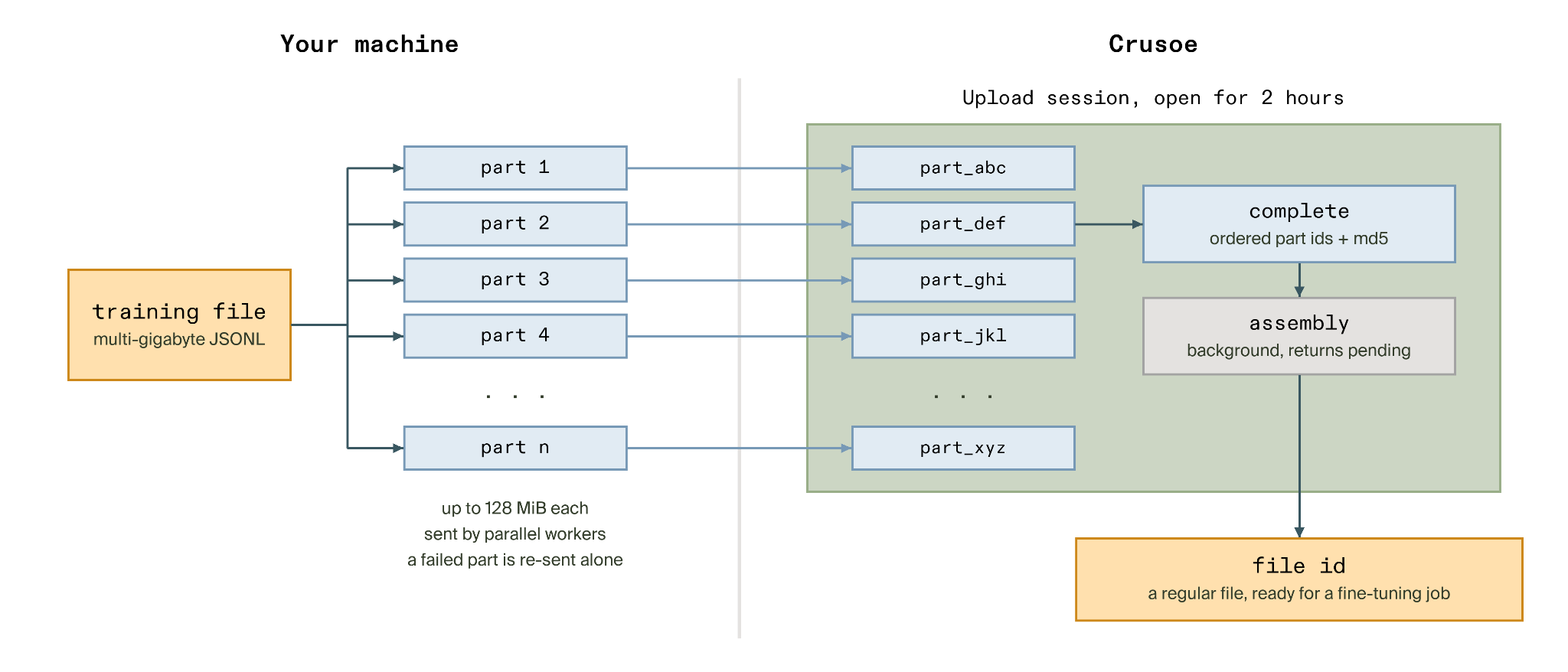
You can now split a file into parts and send them in parallel. Crusoe reassembles them server-side into one verified file, ready to reference by ID in your fine-tuning jobs. The API matches OpenAI's Uploads API, so you keep the same SDK and one continuous developer experience across file uploads, fine-tuning, and inference.
What you can do now
- Upload multi-gigabyte datasets: The old file size limit (3 GiB) no longer stands in the way. We support up to 16 GiB per upload.
- Keep one workflow: The same OpenAI SDK that you already use for files, fine-tuning, and inference drives multipart uploads too. Additionally, we extended the API with visibility endpoints for tracking upload progress.
- Upload in parallel, resiliently: Parts upload independently, so if one fails, you re-send just that part instead of retrying the entire file.
How multipart upload works
Getting a large file uploaded takes just three steps:
- Create an upload and declare the file's size.
- Add parts by uploading the file in chunks, in any order and in parallel.
- Complete the upload with the ordered list of parts and an optional checksum.
From there, Crusoe takes care of the rest. We assemble the parts in the background, verify the file, and make the completed file available with an ID you can reference directly in a fine-tuning job.
Built to be trusted
The entire path is designed so you don't have to think about it.
- Integrity, verified. Pass a checksum and we check the assembled file against it to protect against issues like transfer corruption.
- Encrypted at rest, compatible with your own customer-managed keys.
- Self-cleaning on cancel and expiry. Cancel an upload anytime, and anything you abandon expires and cleans itself up. No stray parts, no wasted quota.
- Honest about failure. If assembly can't complete, we say so plainly with a
failedstatus and the reason, so you are never left guessing. - Resilient by design. Assembly runs in the background and survives our own deployments and restarts, so an upload in flight isn't lost to a deploy or a crash.
Limits and lifetimes
Here are the limits and lifetimes to plan around.
Note: Crusoe's limits are binary (GiB, MiB). OpenAI's limits are from the OpenAI Uploads API reference.
We have allowed a higher upload ceiling, support larger parts, and a longer session window so that a given file can upload in fewer parts while slower links continue to have more room to finish.
If the session expires mid-upload, its parts expire with it. You may start a new upload in such cases.
Picking a part size
The point of multipart isn't raw speed, but control. Uploading with parts provides retry granularity and a failure model where a dropped connection costs just one part and not the entire file.
Your part size doesn't affect assembly time, so pick a part size for your link, not for the server.
- If your link is stable and fast, use the largest parts (128 MiB) for fewer requests.
- If it is flaky or slow, use smaller parts. This works well because the retry unit is per failed part and every successfully uploaded part stays landed.
Don't forget that you may parallelize your part uploads to further speed up the transfer. As an example, our benchmark client saw a full 16 GiB file uploaded in about 79 seconds with 16 parallel workers, versus roughly 11 minutes single-threaded over the same link (~8x speedup). One connection sustained only ~25 MiB/s, a sliver of the link, while 16 in parallel reached ~208 MiB/s. These results are from an in-region client about 5 ms from the API, so your absolute times will differ, but the gains from parallelizing travel with you.
Get started
If you already use the OpenAI SDK, you already know the shape. Create the upload, add its parts, complete it, then poll until assembly finishes and use the file ID wherever you use files today.
OpenAI's complete returns the finished file synchronously while ours diverges and instead returns pending right away. We did this so that your request does not need to wait for the assembly to finish and you can poll for status. On completion, the file field will have the newly minted file ID.
The snippets below show the API shape, one call at a time.
For a production uploader with parallel parts, per-part retries and resumption within an active session, drop in our open-source helper, multipart-dataset-upload on GitHub.
import hashlib
import os
from openai import OpenAI  # uploads API requires openai >= 1.37

client = OpenAI(
    base_url="https://api.intelligence.crusoecloud.com/v1",
    api_key="YOUR_API_KEY",
)

part_size = 128 * 1024 * 1024  # up to 128 MiB per part (Crusoe's ceiling)

upload = client.uploads.create(
    purpose="fine-tune",
    filename="train.jsonl",
    bytes=os.path.getsize("train.jsonl"),
    mime_type="text/jsonl",
)

# Stream the file in parts, one chunk in RAM at a time.
part_ids = []
file_md5 = hashlib.md5()
with open("train.jsonl", "rb") as f:
    while chunk := f.read(part_size):
        file_md5.update(chunk)
        # On failure, re-send just this part. Each retry mints a fresh part id.
        part = client.uploads.parts.create(upload_id=upload.id, data=chunk)
        part_ids.append(part.id)

# complete returns immediately with status pending.
# See next section on how to poll for completed and the resulting file id.
client.uploads.complete(
    upload_id=upload.id,
    part_ids=part_ids,
    md5=file_md5.hexdigest(),  # optional: we verify the assembled file against it.
)
For the full API reference, see the Crusoe Intelligence Foundry Uploads API reference.
Check in anytime
A long upload raises natural questions while it's in flight. What is still uploading, and which parts have landed?
To answer these, we extended the API with listing and inspection endpoints that give you the much needed visibility into the upload's progress. They're plain REST calls made with the same API key.
Once you call complete, you may poll the same endpoint until assembly finishes and the file ID is ready.
import time
import requests

BASE = "https://api.intelligence.crusoecloud.com/v1"
headers = {"Authorization": "Bearer YOUR_API_KEY"}
upload_id = "upload_..."  # upload.id from client.uploads.create above

# What's still uploading across all sessions?
requests.get(f"{BASE}/uploads", headers=headers, params={"status": "pending"}).json()

# Which parts have landed so far?
requests.get(f"{BASE}/uploads/{upload_id}/parts", headers=headers).json()

# complete returns immediately; poll until assembly finishes, then read the file ID.
while True:  # in production, bound this with a deadline
    upload = requests.get(f"{BASE}/uploads/{upload_id}", headers=headers).json()
    if upload["status"] != "pending":
        break
    time.sleep(5)

match upload["status"]:
    case "failed":
        err = upload["error"] # reason lives here: {"code", "message"}
        raise RuntimeError(f"assembly failed [{err['code']}] {err['message']}")
    case "cancelled" | "expired":
        raise RuntimeError(f"upload {upload['status']}")
    case "completed":
        print(upload["file"]["id"]) # The file id to use for your jobs
This way, you always know where an upload stands, and which parts we've received, without guessing.
Under the hood
Making large files work end to end meant reworking every stage the data passes through, a ground-up rebuild spanning upload assembly, tokenization, and training-time loading. Most LoRA fine-tuning datasets weigh in at megabytes, not gigabytes, so pipelines everywhere, ours included, get tuned for that shape. At the new 16 GiB cap, every stage hit its limits in its own way.
To support these larger files, we made three key improvements through the training infrastructure.
- Upload assembly: A purpose-built, fault-tolerant asynchronous service now handles upload assembly. It concurrently prefetches parts, orders and streams them through a single-pass merge, followed by integrity verification, content validation, and an optionally encrypted push to storage.
- Tokenization: Upgrading the tokenizer pipeline made tokenization 7.4x faster (4 hours to 33 minutes on a 10 GiB dataset), by streaming datasets through a persistent worker pool that keeps every core saturated.
- Training-time loading: Reworking training-time loading made it 29x faster (40 minutes to 82 seconds on a 10 GiB dataset) at 4x lower peak memory per node (~900 GiB down to 228 GiB). This was achieved by having each GPU worker read lazily from columnar storage, touching rows only as training needs them.
Each improvement stands on its own. Together they enable full-size datasets to now flow from upload through training without a stall.
What's next
This is the groundwork for what comes next. We hope that these larger files enable you to experiment with and train larger and more capable models. If you've got a big training job, bring it to Crusoe Intelligence Foundry, our managed fine-tuning service.
The fine-tuning API became generally available in July. If your datasets run bigger than 16 GiB or you need something else, contact our team.
Frequently
asked questions
Is multipart upload faster?
Multipart upload is faster when parts are sent in parallel, because several connections use more of the available bandwidth than one. In Crusoe's benchmark, a 16 GiB file uploaded in about 79 seconds with 16 parallel workers, versus roughly 11 minutes on a single connection, about an 8x speedup. Results came from an in-region client about 5 ms from the API, so absolute times vary by network.
When should I use multipart upload?
Use multipart upload when a file is too large to send comfortably in one request, or when the network connection is slow or unreliable. Each part uploads independently, so a dropped connection means re-sending one part instead of the whole file. On Crusoe, multipart upload supports fine-tuning datasets up to 16 GiB, with parts up to 128 MiB.
What is a multipart upload?
A multipart upload splits one large file into smaller parts that are uploaded separately, then reassembled into a single file on the server. Crusoe's version matches OpenAI's Uploads API in three steps: create an upload with the file size, add parts in any order or in parallel, then complete it with the ordered part list and an optional checksum.
What are the limitations of multipart upload?
Crusoe's multipart upload accepts files up to 16 GiB per upload, with each part up to 128 MiB. An upload session stays open for two hours; if it expires mid-upload, its parts expire too and a new upload is needed. The finished file persists by default, or can be set to expire after anywhere from one hour to 30 days.
.jpg)
.jpg)