Virtualizing AMD Instinct™ MI355X GPUs with AMD Pensando™ Pollara 400 AI NIC on Linux KVM
Crusoe became one of the first cloud providers to offer virtualized AMD Instinct MI355X GPU instances on KVM. This post covers the VFIO passthrough setup, RoCE networking with AMD Pensando Pollara 400 AI NICs, and three RCCL debugging problems solved along the way.



In 2026, Crusoe became one of the first cloud providers to offer virtualized AMD Instinct™ MI355X GPUs with the AMD Pensando™ Pollara 400 AI NIC on Linux Kernel-based Virtual Machine (KVM). Getting there required solving a set of challenges that were genuinely new territory for our team: a different networking stack, a different hardware topology, and a chain of non-obvious failures that required digging deep into the AMD ecosystem, RoCE (RDMA over Converged Ethernet) fundamentals, ROCm Communication Collectives Library (RCCL) internals, and AMD's driver model to resolve.
This post covers that work: bringing up VMs powered by AMD Instinct™ MI355X GPUs on Cloud Hypervisor, virtualizing the RoCE supported AMD Pensando™ Pollara 400 AI NICs alongside the GPUs, and debugging the problems that stood between us and a working multi-node GPU cluster.
Background
Our virtualization stack at Crusoe uses Linux KVM with Cloud Hypervisor and Virtual Function I/O (VFIO) passthrough to give VMs direct access to physical hardware. If you're unfamiliar with this setup, our AMD Instinct™ MI300X GPUs virtualization post covers the fundamentals in detail. Our goal for AMD Instinct™ MI355X GPUs was the same: full passthrough virtualization of GPUs, NVMe drives, and network interfaces. The difference is that instead of passing through InfiniBand Host Channel Adapters (HCAs), we're now passing through AMD Pensando™ Pollara 400 AI NIC RoCE NIC Virtual Functions.
What made the AMD Instinct™ MI355X Platform Crusoe deployment different was the system's networking stack. For inter-node GPU communication, our other SKUs use InfiniBand, a dedicated fabric with its own switches and subnet manager. The AMD Instinct™ MI355X Platform instead uses RoCE (RDMA over Converged Ethernet), which delivers the same RDMA capability (bypassing the CPU to move data directly between GPU memories) over standard Ethernet infrastructure, backed by AMD Pensando™ Pollara 400 AI NICs.
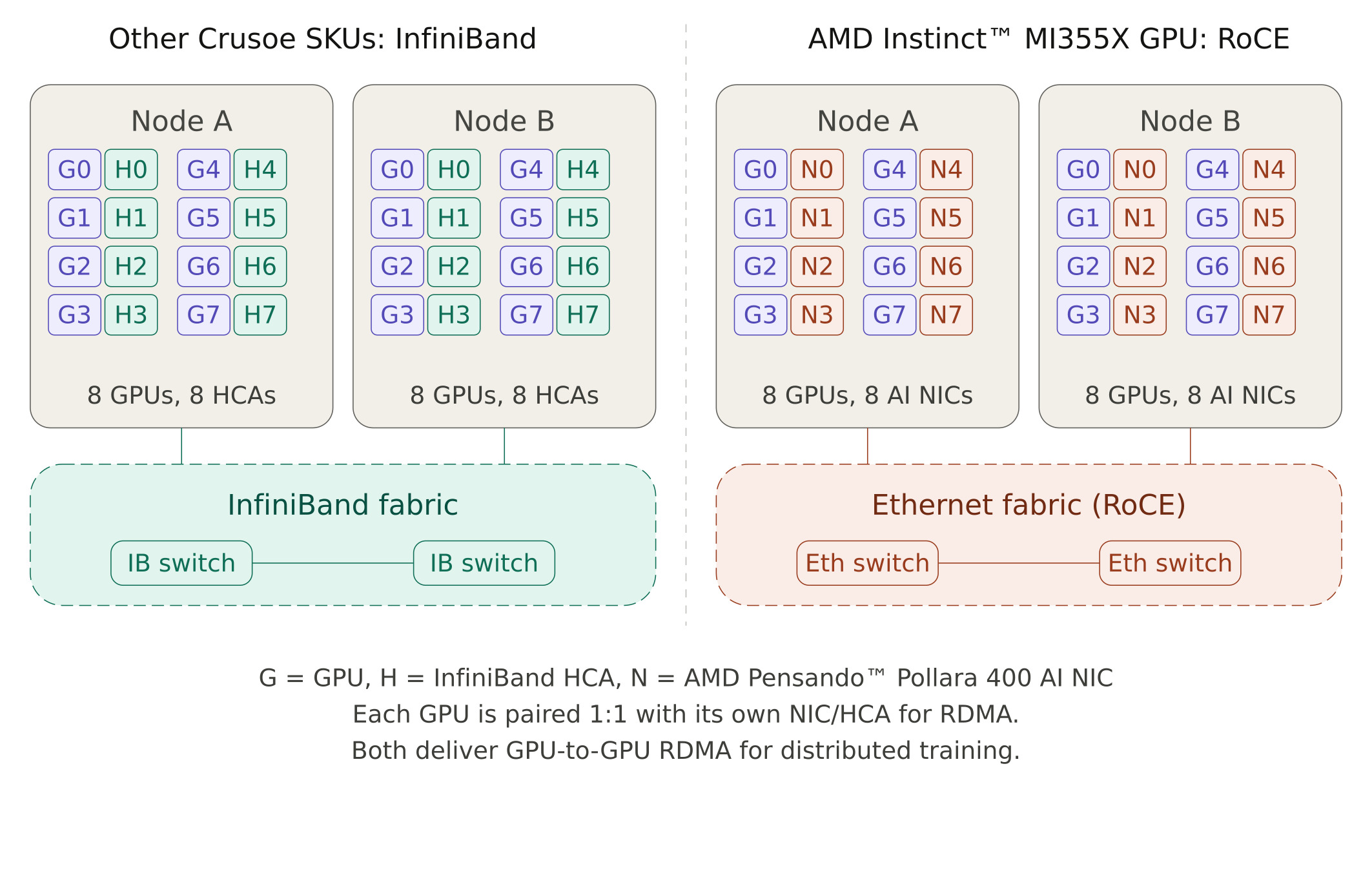
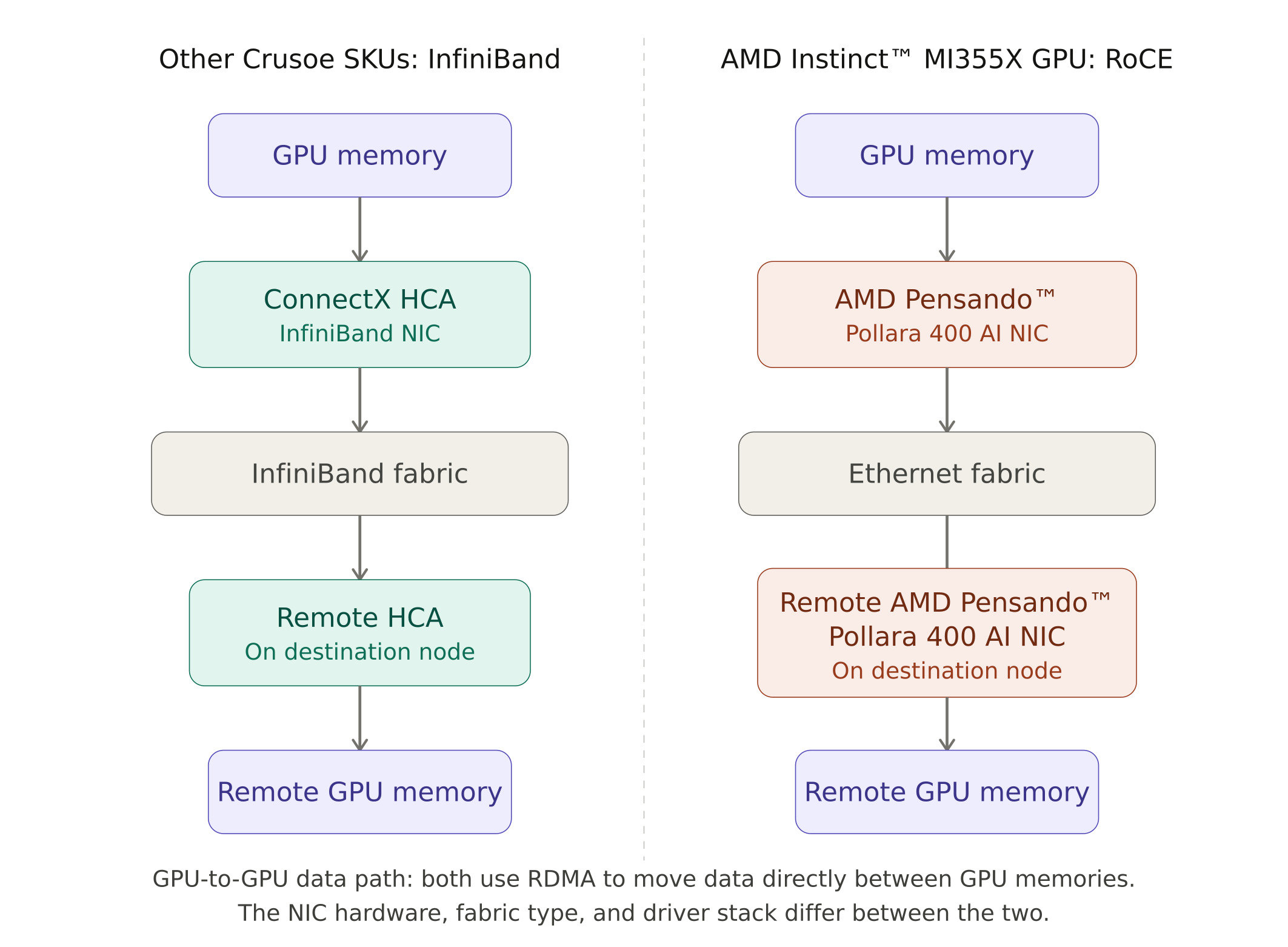
This shifts the virtualization problem in important ways. The device driver model, the GPU memory registration path (DMA-buf instead of the legacy peer-memory API), and the way RCCL interacts with the NIC at the kernel level are all different from what we had handled before. The three debugging problems described later in this post all stem from these differences.
AMD Instinct™ MI355X GPU Virtualization
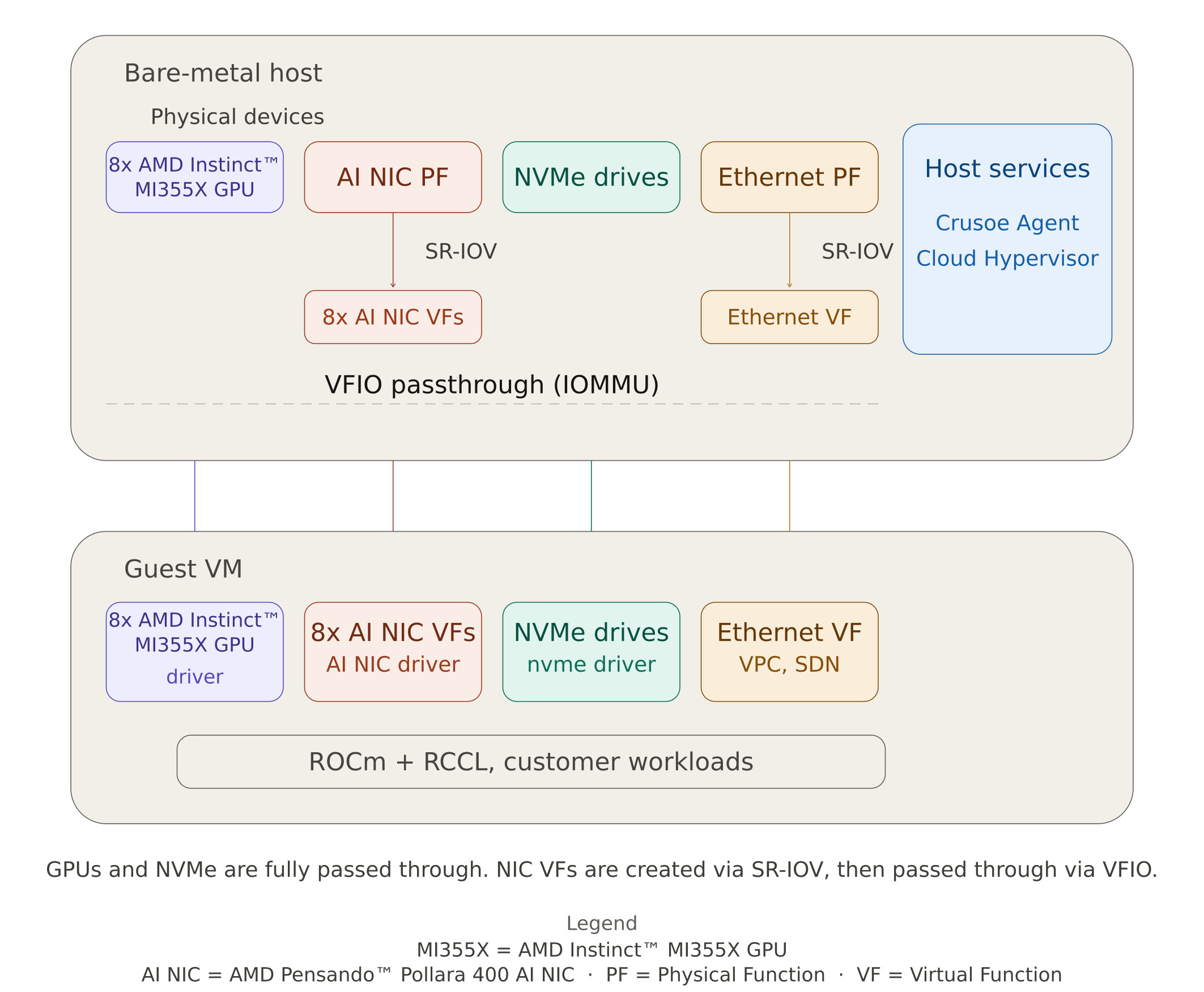
On Crusoe Compute Nodes, each VM gets direct access to physical hardware through VFIO passthrough. Rather than emulating devices in software, the host's IOMMU maps device memory regions directly into the VM, giving the guest near-native performance with full hardware isolation between tenants. On a node with AMD Instinct™ MI355X GPUs, the devices passed through to each VM include:
- 8 AMD Instinct™ MI355X GPUs, bound to the VFIO driver on the host and the AMD GPU driver inside the VM.
- AMD Pensando™ Pollara 400 AI NIC Virtual Functions, split from the physical NIC using Single Root I/O Virtualization (SR-IOV). The physical function stays on the host for management, while the VFs are passed into the VM for GPU-to-GPU RDMA traffic over the RoCE fabric.
- NVMe ephemeral drives, passed through for high-speed local scratch storage.
The Ethernet production NIC is also split via SR-IOV, with a virtual function providing the VM's connectivity to Crusoe's SDN overlays (VPC, file storage, and public internet).
A key enabler here was AMD's ATS (Address Translation Services) support for virtualization, which lets the GPU and AMD Pensando™ Pollara 400 AI NIC do peer-to-peer DMA directly through their shared PCIe switch even when both are passed through to a VM.
Booting the first VM
As a first step in the NPI process, we booted a VM over the Cloud Hypervisor command line with a basic Ubuntu Jammy image. Once the VM was up, we installed the AMD GPU and ROCm drivers along with the AMD Pensando™ Pollara 400 AI NIC drivers, then verified all eight AMD Instinct™ MI355X GPUs were visible and correctly enumerated inside the VM using amd-smi:
$ amd-smi
+------------------------------------------------------------------------------+
| AMD-SMI 26.0.0+37d158ab  amdgpu version: 6.14.14  ROCm version: 7.0.1      |
| Platform: Linux Guest (Passthr)                                              |
|-------------------------------------+----------------------------------------|
| BDF             GPU-Name            | Mem-Uti  Temp   UEC   Power-Usage      |
| GPU  HIP-ID  OAM-ID  Partition-Mode | GFX-Uti  Fan         Mem-Usage        |
|=====================================+========================================|
| 0002:00:01.0  AMD Instinct MI355X  | 0 %    58 °C   0     249/1400 W       |
|  0      0      6      SPX/NPS1     | 0 %    N/A          283/294896 MB     |
|-------------------------------------+----------------------------------------|
| 0002:00:02.0  AMD Instinct MI355X  | 0 %    56 °C   0     261/1400 W       |
|  1      1      7      SPX/NPS1     | 0 %    N/A          283/294896 MB     |
|-------------------------------------+----------------------------------------|
| 0002:00:03.0  AMD Instinct MI355X  | 0 %    57 °C   0     256/1400 W       |
|  2      2      5      SPX/NPS1     | 0 %    N/A          283/294896 MB     |
|-------------------------------------+----------------------------------------|
| 0002:00:04.0  AMD Instinct MI355X  | 0 %    56 °C   0     251/1400 W       |
|  3      3      4      SPX/NPS1     | 0 %    N/A          283/294896 MB     |
|-------------------------------------+----------------------------------------|
| 0003:00:01.0  AMD Instinct MI355X  | 0 %    55 °C   0     255/1400 W       |
|  4      4      2      SPX/NPS1     | 0 %    N/A          283/294896 MB     |
|-------------------------------------+----------------------------------------|
| 0003:00:02.0  AMD Instinct MI355X  | 0 %    56 °C   0     258/1400 W       |
|  5      5      3      SPX/NPS1     | 0 %    N/A          283/294896 MB     |
|-------------------------------------+----------------------------------------|
| 0003:00:03.0  AMD Instinct MI355X  | 0 %    56 °C   0     257/1400 W       |
|  6      6      1      SPX/NPS1     | 0 %    N/A          283/294896 MB     |
|-------------------------------------+----------------------------------------|
| 0003:00:04.0  AMD Instinct MI355X  | 0 %    57 °C   0     254/1400 W       |
|  7      7      0      SPX/NPS1     | 0 %    N/A          283/294896 MB     |
+-------------------------------------+----------------------------------------+
+------------------------------------------------------------------------------+
| Processes:                                                                   |
| GPU    PID  Process Name      GTT_MEM  VRAM_MEM  MEM_USAGE    CU %          |
|==============================================================================|
| No running processes found                                                   |
+------------------------------------------------------------------------------+
With all eight AMD Instinct™ MI355X GPUs showing up correctly, we moved on to integrating the AMD Instinct™ MI355X GPU hardware support into the Crusoe Agent. The Agent is a hypervisor management service that runs on individual compute hosts to orchestrate VM lifecycle, resource allocation, and integration with networking and storage infrastructure. Once the Agent changes were in place and VMs were booting cleanly through the normal provisioning path, the next challenge was getting multi-node GPU communication to work, and that meant getting RCCL running correctly over the virtualized RoCE network.
The RCCL Journey
Getting GPU passthrough working is the first milestone. The real test for a compute platform is whether GPUs across nodes can run distributed workloads at full bandwidth, and that means RCCL (ROCm's collective communications library) has to work correctly over the virtualized RoCE network. This was the most technically demanding part of the AMD Instinct™ MI355X GPU NPI, and we hit several issues along the way.
Problem 1: RCCL was routing through the wrong interface
Early in development, our VMs powered by AMD Instinct™ MI355X GPUs didn't yet have public IPs, which is normal during the new platform bring-up before full software-networking integration. To SSH into VMs from the host, we created a vmtap interface as a temporary workaround. It worked fine for access, but introduced an unexpected complication.
RCCL, when not explicitly told which interface to use, scans available interfaces and makes its own routing decisions. With the vmtap interface present, RCCL kept selecting it for management traffic. Instead, the NVIDIA ConnectX front-end NIC VF was supposed to carry inter-node communication. The result was consistent collective failures that looked like network errors but were really just wrong-interface selection.
The fix was explicit pinning, which we were able to configure in our RCCL job by using the below configurations:
export NCCL_SOCKET_IFNAME=<mgmt_interface>
export NCCL_SOCKET_FAMILY=AF_INET
Once pinned to the right interface, this class of failures went away.
Problem 2: GPU memory registration was failing
With the correct interface selected, RCCL still couldn't complete its setup. The error:
NCCL WARN Call to ibv_reg_mr failed with error Bad addressThis was happening during RCCL's attempt to register GPU memory with the AMD Pensando™ Pollara 400 AI NIC, a required step before any GPU-to-GPU data transfer can happen over RDMA. The traditional mechanism for this uses an interface called ib_register_peer_memory_client, which allows the RDMA stack to coordinate directly with the GPU driver for memory registration.
Digging into dmesg on the VM revealed the real story:
failing symbol_get of non-GPLONLY symbol ib_register_peer_memory_clientStarting with kernel 6.8, ib_peermem is no longer available as an inbuilt kernel package. In its place, 6.8 ships with dma-buf as the new inbuilt interface for GPU-to-NIC memory sharing. The AMD Pensando™ Pollara 400 AI NIC VF driver supports both transports, so once we root-caused the failure with help from AMD's engineering team (who were very responsive throughout the process), the fix was to move RCCL to the modern open source path:
export NCCL_DMABUF_ENABLE=1With this flag, RCCL uses the kernel's dma-buf interface for GPU memory registration instead of the legacy peer-memory path. The first successful all-reduce collective across two VMs powered by AMD Instinct™ MI355X GPUs after setting this flag was a meaningful milestone. It confirmed the full data path from GPU memory to AMD Pensando™ Pollara 400 AI NIC VF to RoCE network to remote GPU was working end to end.
Problem 3: Cloud Hypervisor flattens the PCIe topology
RCCL uses an XML topology file to understand the PCIe layout and decide which GPUs communicate via which NICs. On bare metal, the host has a deep PCIe switch hierarchy with NUMA domains, and RCCL can discover GPU-to-NIC affinity directly. Cloud Hypervisor flattens this hierarchy: the guest sees all passthrough devices under root buses rather than nested behind PCIe switches. Without guidance, RCCL can't determine which GPU should pair with which NIC.
The fix was providing RCCL with a synthetic topology file that reconstructs the host's hierarchy using the guest's bus IDs, pairing each GPU with its affinity-mapped NIC VF under a synthetic PCIe switch, grouped by NUMA domain. Here's what one GPU-NIC pair looks like in the topology file:
<!-- Synthetic PCIe switch pairing GPU0 with its affinity-mapped NIC -->
<pci busid="ffff:ff:01.0" class="0x060400"
     vendor="0xffff" device="0xffff"
     link_speed="32.0 GT/s PCIe" link_width="16">
  <pci busid="ffff:ff:10.0" class="0x060400"
       vendor="0xffff" device="0xffff"
       link_speed="32.0 GT/s PCIe" link_width="16">
    <pci busid="0002:00:01.0" class="0x120000"
         vendor="0x1002" device="0x75a0"
         link_speed="32.0 GT/s PCIe" link_width="16"/> <!-- GPU0 -->
  </pci>
  <pci busid="0002:00:09.0" class="0x020000"
       vendor="0x1dd8" device="0x1003"
       link_speed="32.0 GT/s PCIe" link_width="16">
    <nic>
      <net name="ionic_0" dev="0" speed="400000"
           port="1" guid="0x069081fffe3730c8"
           maxconn="2048" gdr="1"/>
    </nic>
  </pci>
</pci>
The ffff:ff:* bus IDs are synthetic placeholders for PCIe bridges that don't exist in the guest. The real device bus IDs (0002:00:01.0 for the GPU, 0002:00:09.0 for the NIC) come from the guest's lspci. By nesting both under the same synthetic switch, RCCL understands they're local to each other and should be paired for RDMA traffic. This structure is repeated for all eight GPU-NIC pairs across both NUMA domains.
The AMD Instinct™ MI355X GPU device IDs also differ from the AMD Instinct™ MI350X GPU, so the file needed updating for the AMD Instinct™ MI355X GPU specifically. A wrong topology file doesn't always produce a hard failure; it can silently degrade collective performance in ways that only show up under careful benchmarking.
Validation
IB Stress Tests
We validated the RoCE fabric layer independently using ib_write_bw with --use_rocm and --use_rocm_dmabuf flags, testing GPU-to-GPU RDMA directly through the AMD Pensando™ Pollara 400 AI NIC VFs using the DMA-buf path. More details on these tools can be found in AMD's perftest repo. We ran a full mesh across all 8 AMD Pensando™ Pollara 400 AI NIC VF pairs between the two VMs powered by AMD Instinct™ MI355X GPUs, with each NIC paired with its affinity-mapped GPU. Every pair came in around ~740 Gb/sec bidirectional bandwidth, confirming that GPU-to-NIC mapping was correct and the DMA-buf RDMA path was working cleanly before we introduced RCCL's collective communication layer on top.
ROCm Validation Suite (RVS)
We ran a full suite of ROCm Validation Suite (RVS) stress tests inside VMs powered by AMD Instinct™ MI355X GPUs, covering compute correctness, memory bandwidth, and intra-node GPU connectivity, to validate driver and firmware configurations before moving to multi-node testing.
Multi-node RCCL
With the full stack in place, we ran the all_reduce_perf sweep across two 8-GPU VMs powered by AMD Instinct™ MI355X GPUs with NCCL_DMABUF_ENABLE=1 enabled. The results came in clean across the board:
#       size         count      type   redop    time   algbw   busbw #wrong
#        (B)    (elements)                      (us)  (GB/s)  (GB/s)
   536870912   134217728  float   sum   2817.1 190.57 357.32   0
  1073741824   268435456  float   sum   5560.4 193.11 362.07   0
  2147483648   536870912  float   sum  11029.0 194.71 365.09   0
  4294967296  1073741824  float   sum  21941.0 195.75 367.03   0
  8589934592  2147483648  float   sum  43756.0 196.31 368.09   0
 17179869184  4294967296  float   sum  87706.0 195.88 367.27   0
# Out of bounds values : 0 OK
# Avg bus bandwidth    : 105.60 GB/s
# all_reduce_perf PASSED ✅
Bus bandwidth climbed steadily above 360 GB/s at large message sizes, peaking at 368.09 GB/s at 8GB. This closely matches AMD's own performance targets for this platform on bare-metal, with zero errors and automated validation passing.
Note: These results were with ROCm 7.0.1. We are currently updating our AMD stack to the latest firmware and ROCm 7.2.0, and performance numbers are expected to improve with the update.
AMD Product Reference
Conclusion
Despite coming in with a brand new networking stack and a set of challenges we hadn't encountered before, we successfully qualified and launched virtualized AMD Instinct™ MI355X GPU instances on Crusoe Cloud in early 2026. The DMA-buf discovery, the topology file fix, and the layered validation approach (IB stress tests first, then RVS, then multi-node RCCL) gave us strong confidence that the full GPU-to-GPU data path was working correctly end to end inside a virtualized environment. We're proud of what the team built here, and excited to see what customers do with it.
AMD Instinct™ MI355X GPU instances are now available on Crusoe Cloud. Reach out to our team to start testing today.
We'd like to thank the AMD engineering team for their support and responsiveness throughout this NPI. Crusoe is proud to be an AMD partner and looks forward to continuing this work together.