Serving LLMs on Crusoe with KServe: From zero to 6,000 tokens/second
KServe collapses the complexity of multi-GPU LLM deployment into a single declarative CRD. This post walks through deploying Qwen2.5-72B on Crusoe Managed Kubernetes, with benchmark results across four load profiles.



Running LLM inference at scale means navigating dozens of possible optimizations: tensor parallelism, disaggregated prefill-decode, KV cache-aware routing, chunked prefill, autoscaling on metrics, and more. Implementing and managing all of that on a multi-GPU Kubernetes cluster can be overwhelming. KServe collapses a lot of that work into a single CRD.You declare what you want, and the operational complexity is handled for you, dramatically shrinking the engineering work required in the past. It abstracts GPU scheduling, autoscaling, load balancing, and intelligent request routing into a declarative inference platform, so you focus on the model rather than the infrastructure.
This blog explains the process of deploying Qwen2.5-72B on Crusoe Managed Kubernetes using KServe, hitting 83 tokens/second per request (12ms per token) and 11,470 tok/s peak on 8x Nvidia H100s. The full working example, including Terraform scripts and Helm charts, is in the Crusoe solutions-library GitHub repo.
The Stack: KServe + vLLM + Envoy AI Gateway
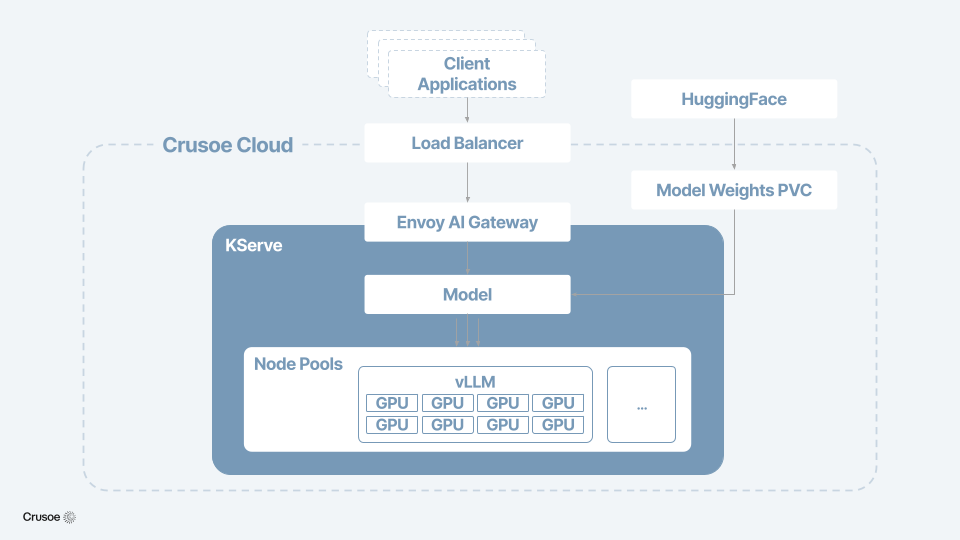
KServe is an open-source inference platform and CNCF incubating project that abstracts GPU scheduling, load balancing, autoscaling, and even advanced serving patterns like disaggregated prefill-decode through a single LLMInferenceService CRD.
vLLM is the inference engine underneath, implementing paged attention, continuous batching, and speculative decoding. KServe wraps it and turns a single-process engine into a distributed model serving system with automatic scaling and failover.
Envoy AI Gateway is the intelligent request router, providing a single stable endpoint for external traffic. It handles token-aware rate limiting, dynamic model routing, multi-tenant auth, usage tracking, and observability. KServe provisions and manages this layer automatically as part of the LLMInferenceService deployment.
Each layer does one thing well:
- KServe manages pod lifecycle, scaling, and intelligent request scheduling
- vLLM handles the actual inference, running the model on our GPUs with paged attention and continuous batching
- Envoy AI Gateway routes external traffic in and enforces policies at the edge
How the LLMInferenceService CRD works
KServe recently split into two CRDs: the classic InferenceService for predictive machine learning, and a new LLMInferenceService built specifically for generative AI. That split reflects a real difference in requirements: LLM serving has fundamentally different needs than serving a random forest, and a CRD designed for one shouldn’t have to accommodate the other.
The LLMInferenceService CRD is where everything comes together. We’ll cover two serving modes:
- Single-device: the model fits on one GPU. This is the simplest path for any KServe LLM deployment.
- Distributed: the model is too big for one GPU. KServe shards the model across multiple GPUs, handling the coordination between them automatically.
Deploying KServe on Crusoe Managed Kubernetes
The barrier to entry for a KServe LLM deployment is very low. The CRD approach means you're not writing deployment scripts, you're declaring intent and letting the platform do the work. Here's what setup looks like on Crusoe Cloud.
The Crusoe solutions library has a complete working example that automates the entire flow. One terraform apply creates a CMK cluster with GPU and CPU node pools, installs KServe v0.17.0 with all dependencies, and configures the namespace. From there, deploying a model is a single Helm command.
For a small model like Qwen2.5-0.5B on a single H100 GPU, the entire LLMInferenceService manifest is about 25 lines of YAML:
apiVersion: serving.kserve.io/v1alpha1
kind: LLMInferenceService
metadata:
  name: qwen-llm
  namespace: kserve-test
spec:
  model:
    uri: hf://Qwen/Qwen2.5-0.5B-Instruct
    name: qwen
  replicas: 1
  template:
    containers:
      - name: main
        image: vllm/vllm-openai:latest
        resources:
          limits:
            nvidia.com/gpu: "1"
    nodeSelector:
      crusoe.ai/accelerator: nvidia-h100-80gb-sxm-ib
  router:
    gateway: {}
    route: {}
    scheduler: {}
replicas sets the number of serving pods, template defines the container spec including the vLLM image and GPU resource request, and router provisions the Envoy Gateway, HTTPRoute, and KV cache-aware scheduler, all with default configuration. This uses only one pod and one GPU, just enough to verify the setup works and send test requests.
Apply it, wait for the pod to pull the model from HuggingFace, and you've got an OpenAI-compatible /v1/chat/completions endpoint. KServe handles the storage-initializer and the vLLM runtime configuration.
Multi-GPU LLM deployment: Serving a 72B parameter model
Running a 0.5B model on a single GPU is straightforward. The more meaningful task is deploying a model that is too large for one GPU and ensuring it runs as a single coherent service across devices. This is where KServe's value as a Kubernetes-native inference platform becomes clear.
Qwen2.5-72B-Instruct needs ~144GB of VRAM in bf16, more than a single H100 GPU can hold. We deployed it across 8x Nvidia H100 SXM 80GB on a single Crusoe node using tensor parallelism (TP=8). The Helm chart in the solutions library handles this via a simple make deploy-70b command.
One thing to note when using a large model like this: the 144GB download exceeds the node's ~120GB ephemeral storage limit. To handle this, we added a 250Gi PVC backed by Crusoe's SSD CSI driver to the Helm chart. It overrides KServe's default emptyDir volume so model weights persist across pod restarts. This also means the storage-initializer doesn't need to re-download the model after a scale-to-zero event or node reschedule. The storage-initializer also needs its memory limit bumped to 64Gi (default is 1Gi, which OOM-kills on large downloads). Both are automated in the Terraform setup.
To verify our endpoint delivered reasonable throughput, we benchmarked with vllm bench serve: vLLM's built-in benchmark that generates realistic traffic and measures proper TTFT (time to first token), TPOT (time per output token), and inter-token latency. Here's Qwen2.5-72B on 8x Nvidia H100 SXM 80GB across four load profiles:
At low load, the deployment is responsive: 12ms median TPOT, 38ms TTFT, 83 tokens/second per request. What degrades most under heavier load is TTFT, not decode speed. At 100 req/s with 2k-token inputs, TTFT balloons to 5.9 seconds while TPOT only rises to 64ms because requests queue for prefill. This can be addressed with disaggregated serving, which KServe also supports.
Those numbers represent strong performance for a 72B model on a self-managed cluster, and reaching them required minimal custom orchestration.
What's next
Deploying large AI models reliably on Kubernetes used to require significant custom orchestration work. KServe collapses that into a model serving stack you can stand up in a few commands, but there is plenty of room to go further.
From here, these are the next optimizations worth exploring:
- Disaggregated serving: split prefill and decode across separate GPU pools so long-input spikes don’t block decode. Assign compute-optimized GPUs to prefill and cost-efficient GPUs to decode, isolating TTFT from token generation latency under load.
- Multi-model routing: serve multiple models behind a shared Envoy AI Gateway with path-based routing, so a single endpoint handles chat completions on the 72B model and embeddings on a lightweight model without exposing separate endpoints to clients.
- KEDA autoscaling: scale replicas based on vLLM-native metrics like request queue depth and KV cache utilization.
The full example, including Terraform for cluster provisioning and Helm charts for the different deployment modes, is available in the Crusoe solutions-library GitHub repository. Clone the repo, fill in your project ID and HuggingFace token, and run make setup. From there, a single make deploy-* command launches the deployment mode of your choice, whether that's a single-GPU model or a tensor-parallel 72B model, and you'll have a working LLM endpoint running on your own Kubernetes cluster.