Slurm on Crusoe Managed Kubernetes: How we built managed GPU training infrastructure
Slurm is the standard for large-scale GPU training, but operating it as a managed cloud service is a different problem entirely. This post covers how Crusoe built Slurm on Managed Kubernetes using Slinky v1.0, including the architecture decisions, tradeoffs, and what's next.

For the researchers and ML engineers training today's largest models, Slurm is the standard. sbatch and srun are muscle memory. When NVIDIA acquired SchedMD it reinforced what the AI training community already knew: Slurm is critical infrastructure for GPU workloads, and it's not going anywhere.
But running Slurm and operating Slurm are different things. Standing up a production Slurm cluster in the cloud means provisioning compute nodes, configuring shared filesystems, managing user identity across every node, validating GPU health, and keeping the whole thing running through hardware failures and software updates. None of that is core to Slurm's strength of scheduling but all of it has to work perfectly for Slurm to be useful.
This post covers the technical decisions behind how we built Crusoe Managed Slurm on Crusoe Managed Kubernetes (CMK): the architecture, the open-source components we chose and why, the problems we had to solve to make it work as a managed service, and where things are headed.
Slurm and Kubernetes: Complementary systems
Kubernetes and Slurm were designed for different kinds of workloads. Kubernetes excels at scheduling long-running services with flexible resource requirements on single nodes, and can scale its resource pool to meet demand. Slurm excels at quickly scheduling finite GPU training jobs with well-defined resource requirements and topology, across multiple nodes, on a known resource pool. Their strengths are complementary.
Putting Slurm inside Kubernetes brings it into a cloud-first model. Kubernetes handles pod health checks, automatic restarts, and rolling updates for Slurm components. If the Slurm controller fails its liveness probe, Kubernetes automatically restarts it.
But the deeper advantage is that the entire Crusoe platform compounds. Running Slurm on the same Kubernetes platform that already powers CMK means we didn't build parallel systems. We extended what we already had. AutoClusters, our automated GPU health monitoring and node replacement system, operates at the Kubernetes layer. Metrics and observability through Command Center are built on the same foundation. Every platform capability we ship for CMK, from topology-aware visibility and GPU telemetry via DCGM to automated node remediation from a warm spare pool, becomes available to Crusoe Managed Slurm because it's running on the same substrate.
Why we built on Slinky
Slinky is SchedMD's official project for running Slurm on Kubernetes. It provides a Kubernetes operator and custom resource definitions (CRDs) for managing Slurm cluster lifecycles: controller pods, login pods, and compute node pods (NodeSets). As the upstream project maintained by the team that develops Slurm itself, Slinky gives us a foundation with wide community adoption, direct alignment with Slurm's release cycle, and a CRD model that evolves alongside the scheduler. Building on that foundation let us focus our engineering on the managed experience and deep integration with Crusoe's GPU infrastructure platform.
The Slinky v0.x limitations
Before settling on Slinky, we evaluated building from scratch: containerizing Slurm ourselves and writing a custom Kubernetes operator to manage its lifecycle. That was a viable path, but it meant taking on the full burden of maintaining Slurm's integration with Kubernetes long-term. That's a surface area we didn't want to own when SchedMD was actively building the upstream solution.
We started experimenting with Slinky during the v0.x series, beginning with v0.1.0 in November 2024 through v0.3.0 in June 2025. These releases proved out the vision: Slurm components running as pods, CRDs for defining cluster topology, and basic lifecycle management all worked. But the operational model wasn't ready for a managed service.
Upgrades between v0.x minor versions required uninstalling all Helm charts, deleting every CRD, and reinstalling from scratch. For transparent, zero-downtime upgrades, that was a non-starter. The operator didn't coordinate with Slurm's job state during disruptions, so pods could be terminated while jobs were still running. And when Kubernetes cordoned a node due to a GPU failure, that signal didn't propagate to Slurm's scheduler, which might still try to place jobs on a node already being evicted. Even within the Slinky ecosystem, observability was a separate project: the slurm-exporter lived in its own repository with its own release cycle and had to be deployed and updated independently from the operator. It was eventually archived and replaced with native Prometheus scraping in v1.0, but it illustrates how the Slinky ecosystem was still consolidating, with several moving parts that a managed service provider would need to track and integrate.
In short, v0.x validated that Slurm on Kubernetes was the right direction, but it would have been extremely difficult for a cloud provider like Crusoe to operate without significant modifications.
What changed in Slinky v1.0
Slinky v1.0 (rc1 shipped November 2025, GA shortly after) was that clean break. The v1alpha1 CRDs were removed entirely and replaced with a new API that supports CRD conversion, meaning v1.Y upgrades work by upgrading the CRD chart, then the operator chart, and existing SlurmCluster resources are automatically handled. No uninstall, no CRD deletion, no disruption to running clusters.
But the upgrade path, while the most important change for us, wasn't the only one. v1.0 brought capabilities that directly addressed the production gaps we'd hit:
- Graceful pod disruption handling. The operator now drains Slurm nodes before terminating pods during scale-in or upgrades. Running jobs are respected. The pod isn't killed until Slurm confirms the node is drained.
- Kubernetes cordon-to-Slurm drain synchronization. When a Kubernetes node is cordoned, NodeSet pods on that node are automatically cordoned and their Slurm nodes drained. When the node is uncordoned, Slurm undrain follows. This is the integration point that makes AutoClusters work seamlessly with Slurm. A GPU failure detected at the infrastructure layer propagates cleanly into Slurm's scheduling state.
- Slurm node states as pod conditions. States like Idle, Allocated, Down, and Drain are reflected directly on each NodeSet pod, making Slurm cluster health visible through standard Kubernetes tooling and our Command Center observability stack.
- Hostname-based resolution. NodeSet pods get predictable hostnames (e.g.,
gpu-2-1), enabling direct pod-to-pod communication without service discovery overhead. This matters for Slurm's node management and for researchers debugging multi-node training jobs.
This was the version where Slinky became a foundation we could build a managed product on. The combination of non-destructive upgrades, workload-aware lifecycle management, and Kubernetes state synchronization gave us the primitives we needed and let us focus our engineering on the Crusoe-specific integration layer rather than reimplementing what SchedMD was building upstream.
Architecture: The Crusoe Slurm operator
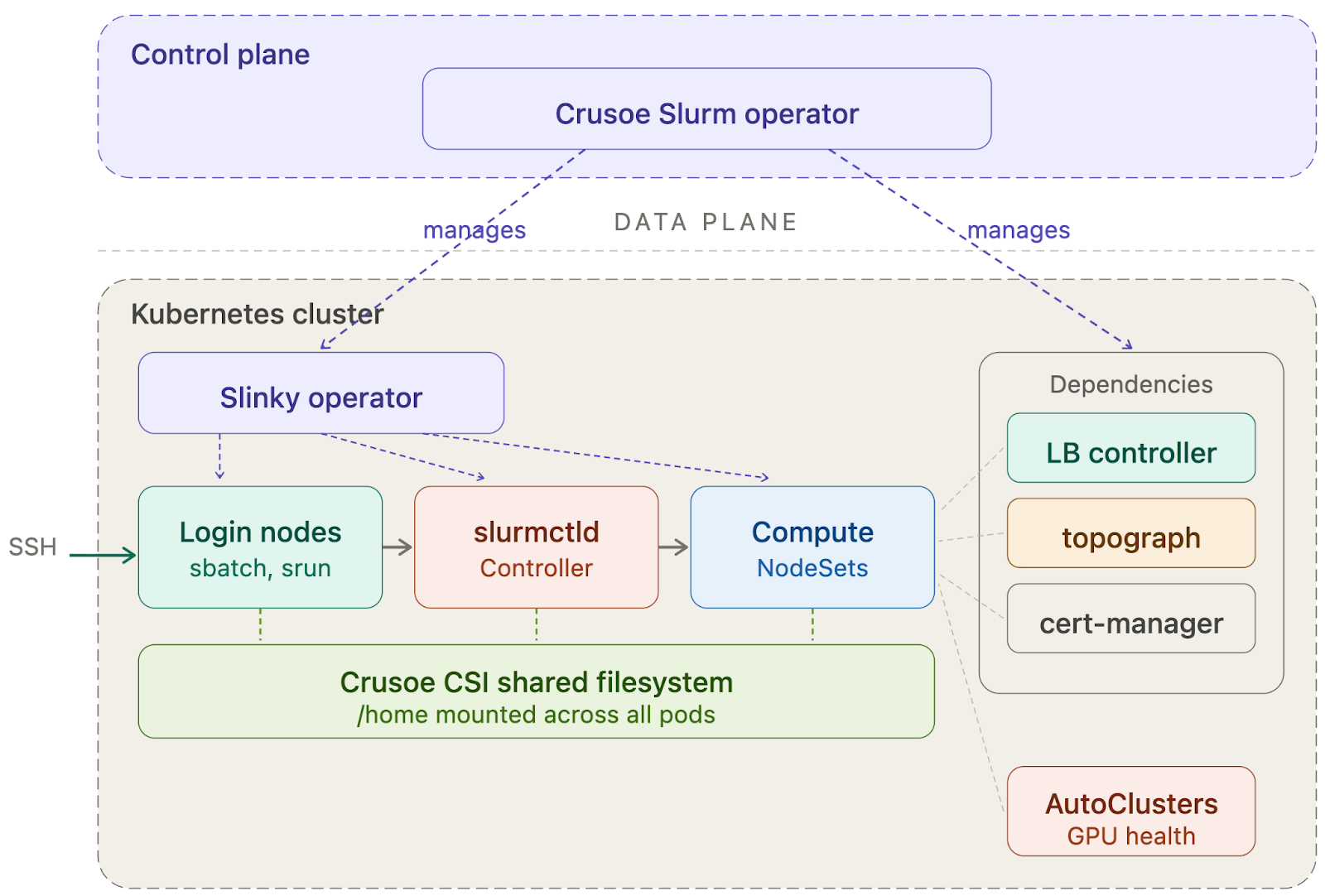
The Crusoe Slurm operator runs in the Crusoe control plane, isolated from customer workloads.
The separation is deliberate. The operator has control plane access and manages the lifecycle of all Slurm dependencies. Customers interact with it exclusively through CRDs (SlurmCluster, NodeSet, SlurmUser, SlurmUserGroup), not by modifying operator configuration directly. This gives us a stable, declarative API that we can evolve on the backend without breaking existing clusters.
What the operator manages
When a customer enables the Slurm add-on, the operator bootstraps the full dependency stack:
- Slinky Operator — deployed and managed by the Crusoe operator, handles the day-to-day reconciliation of Slurm controller, login, and compute pods.
- Crusoe CSI Driver — provides the shared persistent filesystem mounted at /home across all pods. This ensures training scripts submitted from a login node are visible on compute nodes, and model checkpoints and job output are accessible after completion.
- Load Balancer Controller — exposes the SSH endpoint for login node access.
- Cert-Manager — automates TLS certificate lifecycle for the operator's Kubernetes admission webhooks, which validate and enforce configuration correctness on Slurm custom resources.
- Identity system — our Kubernetes-native user management layer (described below).
The operator ensures all dependencies reach a healthy state before marking the cluster as ready.
User identity with Kubernetes-native CRDs
Traditional Slurm clusters manage user identity through LDAP or NIS, a running directory service that every node queries for passwd and group lookups. In a Kubernetes environment where pods are ephemeral and can restart at any time, maintaining a stateful directory service adds complexity and introduces a runtime dependency that can break SSH authentication if it goes down.
We had an additional constraint: the identity system runs in the customer's data plane, not in Crusoe's managed control plane. User lookups need to resolve locally within the customer's cluster, with no external dependency at authentication time. But we also didn't need to build state management from scratch. Kubernetes already provides durable, replicated state through etcd-backed resources like ConfigMaps, Secrets, and custom resources, with built-in versioning and automatic sync to every node via the kubelet. We leaned into that.
Admins create SlurmUser and SlurmUserGroup custom resources to manage identity. Each SlurmUser specifies the user's SSH public keys:
apiVersion: slurm.crusoe.ai/v1alpha1
kind: SlurmUser
metadata:
  name: bob
  namespace: slurm
spec:
  clusterReference: my-slurm-cluster
  fullName: Bob
  sshPublicKeys:
    - ssh-ed25519 AAAAC3...
When a user resource is created or updated, the operator assigns a UID/GID and distributes the identity data across all Slurm pods. Identity information is stored in ConfigMaps and SSH keys in Secrets, both volume-mounted onto login, compute, and controller pods. The kubelet's built-in sync ensures all pods pick up changes automatically, with no restart required. Users can SSH in within about a minute of being created, and groups can be used for partition access control.
The result: consistent Unix identity across every node in the cluster, with no running directory service, no network dependency at lookup time, and fully declarative management through standard Kubernetes resources.
Two personas, separated by design
The system is designed for two personas who never need to learn each other's tools.
AI researchers connect via SSH, submit jobs with sbatch and srun, and monitor with squeue and sinfo. Each gets a dedicated login node with sudo, so they can compile code, install packages via conda or pip, and set up their environment. The home directory is a shared filesystem (Crusoe CSI) mounted read-write across all pods. Scripts written on the login node are visible on compute nodes, and job output written by compute nodes is accessible from the login node. No staging step, no data movement. At no point does a researcher need to interact with Kubernetes.
Kubernetes administrators manage the cluster lifecycle through kubectl or the Crusoe console. They enable the Slurm add-on, scale compute by adding or removing NodeSets, and deploy additional services alongside Slurm – observability stacks, network policies, backup tools. They interact with Slurm through CRDs, not by editing slurm.conf.
The hard part
Slurm and Slinky were designed for operators running their own clusters, not for cloud providers delivering a managed service. The operator primitives and CRD model give you a strong starting point, but there were parts we needed to change and parts that took more engineering than we expected: GPU topology, node lifecycle, container images, and the operational model a managed product demands. Here's where we invested and where gaps remain.
Dynamic topology: Telling Slurm where the GPUs actually are
For AI training workloads, topology isn't optional. GPUs within the same NVLink domain communicate orders of magnitude faster than GPUs across racks connected by InfiniBand. A training job that spans domain boundaries without awareness of the topology will see measurable throughput regression.
Slurm uses a topology.conf file to understand the physical layout of the cluster: which nodes share a switch, which switches form a block, and how blocks are connected. This works well when the cluster is static. But in a Kubernetes environment, the topology is dynamic. Nodes can be added, removed, or replaced (especially during AutoClusters remediation), and the topology.conf must reflect the actual state of the infrastructure at all times.
We use NVIDIA's topograph to dynamically discover the topology of the Kubernetes cluster. Topograph reads node-level metadata, specifically annotations that Crusoe's infrastructure layer stamps on each Kubernetes node encoding its position in the physical network (NVLink domain, partition, switch hierarchy), and generates a topology.conf that the Slurm controller picks up. When the cluster changes, topograph regenerates the topology and Slurm reconfigures accordingly, without operator intervention.
Making Slurm GPU-ready out of the box
Slinky's container images ship with Slurm but not the GPU software stack. There's no CUDA, cuDNN, NCCL, or InfiniBand libraries included. This is by design: Slinky is a general-purpose Slurm operator, and SchedMD expects users to build custom images layering GPU libraries on top. That works for a single on-prem cluster, but not for a managed service where GPU training needs to work out of the box.
We built GPU-ready images for the components that need them: slurmd compute nodes and login pods. These are the pods where researchers run training jobs and set up their environments, so they need the full accelerated computing stack available. Our images start from nvidia/cuda and include cuDNN, NCCL, the full Mellanox OFED InfiniBand stack, NVIDIA HPC-X, DCGM, NCCL tests, and common dev tools.
Customers can run multi-node NCCL tests or launch PyTorch distributed training from the login node without building a single container. Researchers who need specific versions can still install packages directly on the login node via sudo and a shared filesystem. Everything works on day one, and nothing prevents customization.
Controller high availability: an honest gap
One area where we're still working with the upstream Slinky project is controller high availability. Today, slurmctld runs as a single pod. If it fails, Kubernetes restarts it, typically within one to two minutes, and Slurm's internal state recovery handles the transition. Running jobs continue; they don't depend on the controller being up. But there is a brief window where new job submissions and squeue queries will fail.
Traditional Slurm deployments solve this with a primary/backup controller pair. Slinky doesn't yet support this natively. For v1 of Crusoe Managed Slurm, we mitigate this with aggressive liveness probes and fast pod restart, but true HA such that a node can fail but the controller remains available is our number one ask to the community and something that is on our roadmap.
We're calling this out because it's the kind of gap that matters for teams running continuous training jobs over multiple weeks. The controller restart window is short and jobs survive it, but it's an area where we want to be transparent about current limitations and where we're headed.
GPU health and AutoClusters
If you've read our AutoClusters post, you know that GPU interruptions in large training clusters are routine. At 1,024 GPUs, mean time between interruptions drops to about 8 hours, meaning multiple interruptions per day.
Distributed training jobs on Slurm are tightly coupled across nodes. Every GPU in the job must be healthy for training to make progress. A single failing GPU doesn't just degrade throughput. It can hang an entire multi-node training run, forcing a rollback to the last checkpoint and wasting every GPU-hour of work since that checkpoint was written.
Because Slurm runs on the same Kubernetes platform as CMK, the detection and replacement infrastructure applies directly.
What we've built today: when AutoClusters detects a node failure, the system updates our operator to drain the Slurm node, allowing running jobs on that node to complete or be requeued. The underlying Kubernetes node is replaced from the spare pool, the new node joins the cluster with the correct topology annotation, and Slurm's partition is updated.
What we're actively building: tighter coordination between the AutoClusters remediation loop and Slurm's job state. The goal is detecting a degrading node before it fails hard, kicking off a customer-specified action to checkpoint or clean up, then gracefully replacing the node. This turns a job-killing failure into a brief pause.
What's next
Crusoe Managed Slurm on CMK is intentionally focused: single-tenant GPU training clusters with a familiar Slurm interface, managed infrastructure, and the platform capabilities that come from running on CMK. These are some areas we are exploring:
Inference and training, one cluster. Today, most organizations run training on Slurm and inference on a separate Kubernetes deployment, which means two resource pools, two operational models, and idle GPUs on both sides. Because Slurm already runs on CMK, we're in a natural position to schedule both workloads on the same cluster, letting GPUs shift between training and serving without requiring a second infrastructure stack.
API-driven. Researchers shouldn't need to learn Kubernetes to use Slurm, and administrators shouldn't need to SSH into nodes to manage clusters. We're working toward a control plane where cluster lifecycle, user management, and configuration are fully API-driven, abstracting Kubernetes so that everything from provisioning to scaling can be automated programmatically.
Accounting. Slurm's built-in accounting tracks per-job GPU-hours, CPU-hours, and memory usage through slurmdbd. Integrating this into Crusoe Managed Slurm can give teams detailed, job-level visibility into resource consumption, whether that feeds into Crusoe's billing and usage reporting, drives fair-share scheduling policies across research groups, or both.
Conclusion
We built Crusoe Managed Slurm on CMK by leaning into open source and running it on the same Kubernetes platform that powers Crusoe Managed Kubernetes. Researchers get the Slurm interface they already know. Kubernetes admins get the declarative GPU infrastructure they expect. And because it's all running on the same foundation, every platform capability, from AutoClusters to Command Center, works out of the box.
If you're running distributed GPU training workloads and want a Slurm environment without the infrastructure overhead, explore Crusoe Cloud to get started, or contact our infrastructure experts to discuss your specific AI training workloads.