Why RDMA-heavy VMs need host memory headroom, and how to manage it
Every GPU buffer registered for RDMA costs host memory outside your VM, and at GPU scale that can reach gigabytes per NIC. Crusoe bounds the cost with a per-VF budget in NIC firmware.




Your workload registers GPU memory (HBM) for remote direct memory access (RDMA) inside a VM. Each call succeeds and returns a key, and inside the guest nothing else changes. On the host, the network card takes memory to keep track of what you registered, and no process shows it.
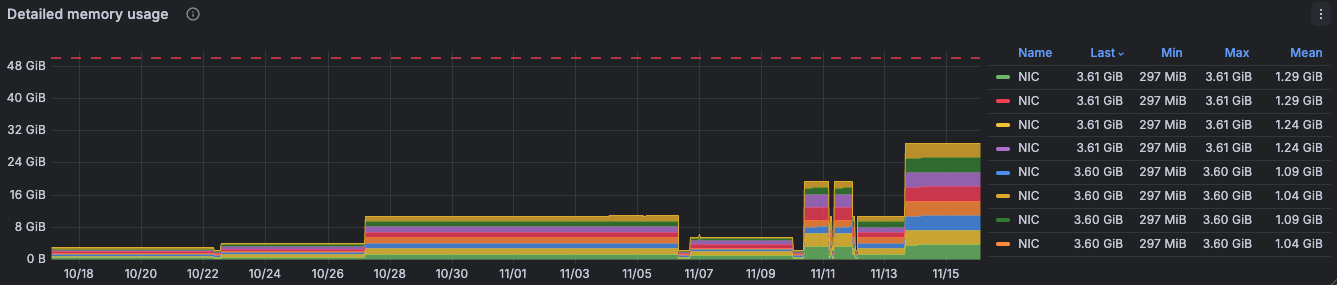
RDMA lets a network card read and write a buffer directly, without involving the remote CPU or operating system, so the card keeps a record of every buffer it may touch and every connection it serves. Its on-chip memory is far too small to hold that record, so the record lives in host RAM that your VM cannot see. Most workloads in our fleet keep this RDMA memory registration overhead under about 1 GiB per NIC, but RDMA-heavy ones, like disaggregated inference and mixture-of-experts (MoE) training, have pushed a single NIC to between 4 and 6 GiB.
This post follows that memory from the registration call down to the host and shows why the cost grows with the amount of GPU memory you register. It then explains how Crusoe keeps one VM's registrations from affecting anyone else on the server, and closes with what to do when your workload needs more. It covers Crusoe GPU VMs with NVIDIA ConnectX®-7 InfiniBand network adapters, passed through to the VM as single-root I/O virtualization (SR-IOV) virtual functions (VFs).
Where the hidden memory goes
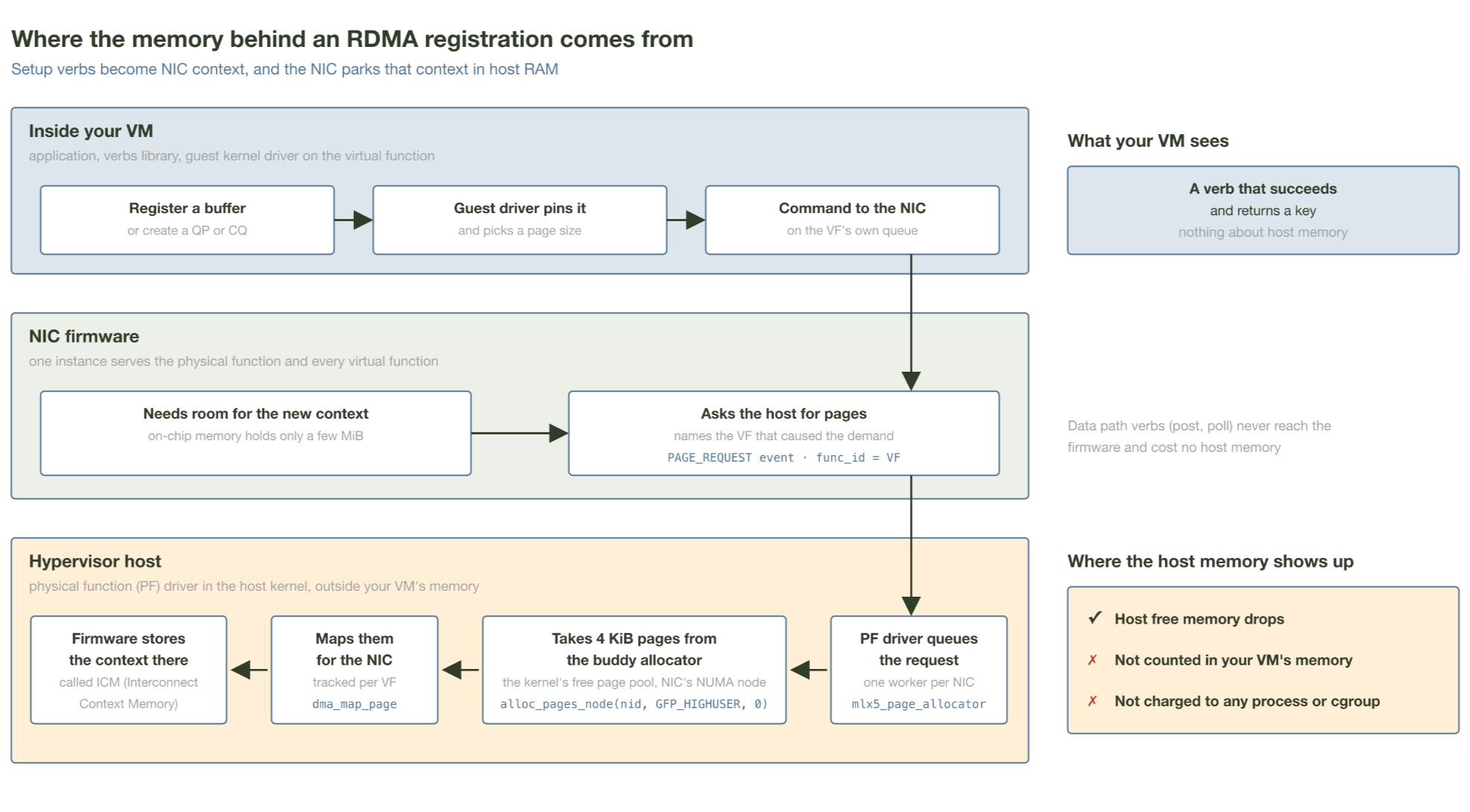
RDMA verbs, the API calls an application uses to set up and drive RDMA, split into two halves. Control path verbs create, modify and destroy objects, and each one passes through the guest kernel and ends as a command to the NIC firmware. Data path verbs post work and poll for completions, and they never leave user space.
control path (each call ends as a firmware command) ibv_alloc_pd() protection domain ibv_reg_mr(), ibv_reg_dmabuf_mr() pin and register a buffer ibv_create_cq() completion queue ibv_create_qp() queue pair ibv_modify_qp() connect the queue pair to a peer data path (kernel bypass, no firmware commands) ibv_post_send(), ibv_post_recv(), ibv_poll_cq()Every control path verb creates a state the NIC must keep, such as a queue pair context, a completion queue context or a memory key with its address translations. The NVIDIA ConnectX-7 adapter keeps very little of it on the chip. The on-chip memory size is not published, but a 2022 ASPLOS study reports 4 MiB on the earlier NVIDIA ConnectX-6 Dx adapter, while the context a busy NIC holds is measured in GiB. So the firmware treats on-chip memory as a cache and keeps the full context in host RAM, in a region it calls Interconnect Context Memory (ICM), tracked in 4 KiB pages.
Under SR-IOV one firmware instance serves the physical function (PF) on the host and every VF. When a VF's command needs more ICM, the firmware asks the host's PF driver for pages, and the driver allocates them from host memory. Your VM sees only a verb that succeeds and returns a key. The host sees free memory shrink with no owning process. The pages go back only when the guest destroys the objects that needed them.
Why RDMA memory registration overhead grows with GPU scale
The context grows along two axes. Queue and memory key contexts grow with the number of objects a workload creates. Translation entries grow with the number of bytes registered.
| Verb | Context stored in ICM | Grows with |
|---|---|---|
| ibv_create_qp | Queue pair context | Number of queue pairs, fixed size each |
| ibv_create_cq | Completion queue context | Number of completion queues, fixed size each |
| ibv_reg_mr, ibv_reg_dmabuf_mr | Memory key context | Number of memory regions, fixed size each |
| ibv_reg_mr, ibv_reg_dmabuf_mr | Memory translation table (MTT) entries | Registered bytes, 8 bytes per mapped page |
A registered buffer is contiguous in virtual memory but scattered physically, and a remote peer addresses it by virtual address. So the NIC keeps its own page table for each region, the memory translation table (MTT), with one 8-byte entry per mapped page. The guest driver chooses the largest page size the buffer's physical layout allows, called the mkey page size, and that choice fixes the cost.
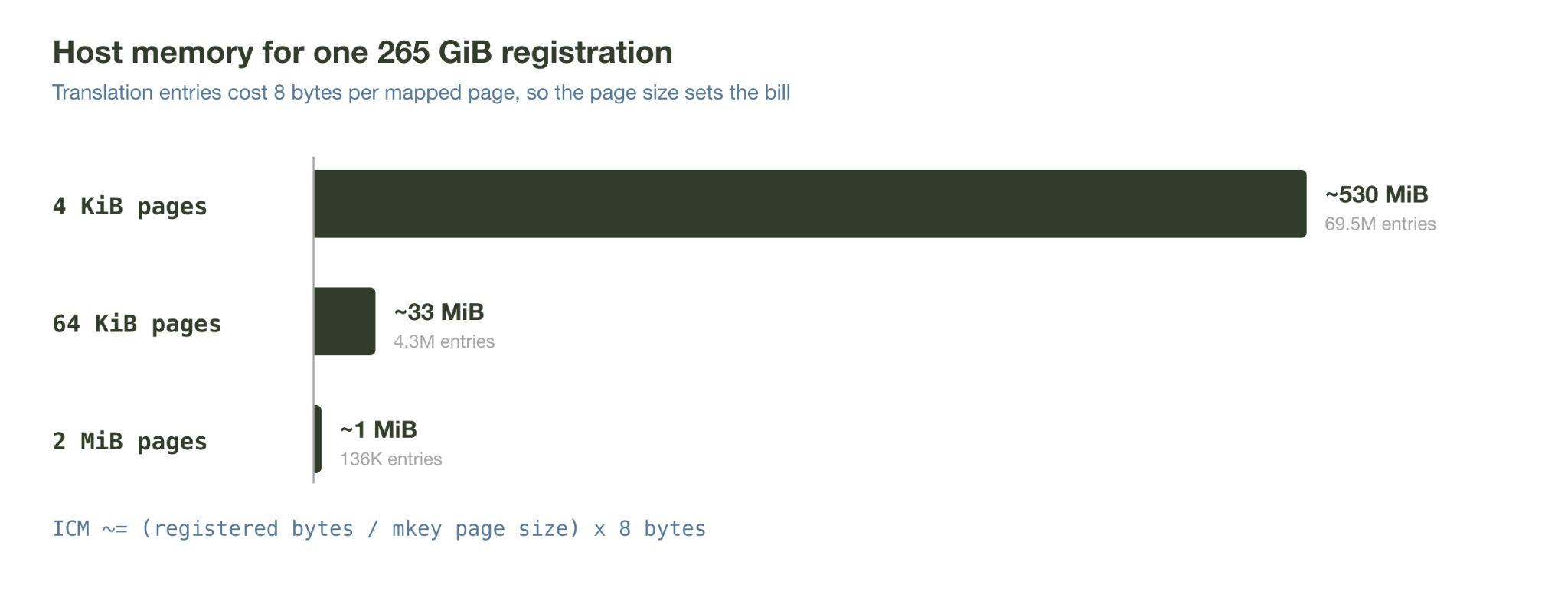
ICM for one memory region ~= (registered bytes / mkey page size) x 8 bytesAt 4 KiB pages, the translation entries for one registration come to about 1/500 of its size, or 2 MiB per GiB. That looks harmless until registrations reach GPU scale, and a workload that registers the same buffers on every NIC pays it once per NIC. The following table shows a 265 GiB registration at three page sizes.
| One 265 GiB registration, mkey page size | MTT entries | ICM for the MTTs | 4 KiB firmware pages |
|---|---|---|---|
| 4 KiB | 69,468,160 | ~530 MiB | ~135,700 |
| 64 KiB | 4,341,760 | ~33 MiB | ~8,500 |
| 2 MiB | 135,680 | ~1 MiB | ~265 |
Which workloads drive the cost
Two patterns account for most of this memory. Workloads that register large amounts of GPU memory grow translation entries, and workloads that open many connections grow queue contexts. Some do both. Common cases include the following.
| Pattern | Workloads | What grows |
|---|---|---|
| Large registrations | Disaggregated inference that moves KV cache between prefill and decode GPUs, registering large KV-cache pools on every NIC | Translation entries, once per NIC the memory is registered on |
| Mixture-of-experts (MoE) models with expert-parallel communication, registering a shared buffer of GPU memory on every GPU for all-to-all exchange | Translation entries | |
| Collective communication that registers application buffers directly for zero-copy transfers | Translation entries, growing with buffer size | |
| Many connections | Large training jobs that open a connection to every peer they exchange data with, often several per peer | Queue pair and completion queue contexts, growing with job size |
| GPU-initiated networking, where GPU kernels post RDMA work directly and each GPU keeps many queue pairs | Queue pair contexts | |
| Connection-heavy services such as key-value stores, parameter servers and inference routers serving many clients | Queue pair contexts, growing with client count |
Fragmented buffers make large registrations worse. They force 4 KiB pages, which need 512 times more translation entries than 2 MiB pages for the same registration.
How Crusoe keeps every tenant safe
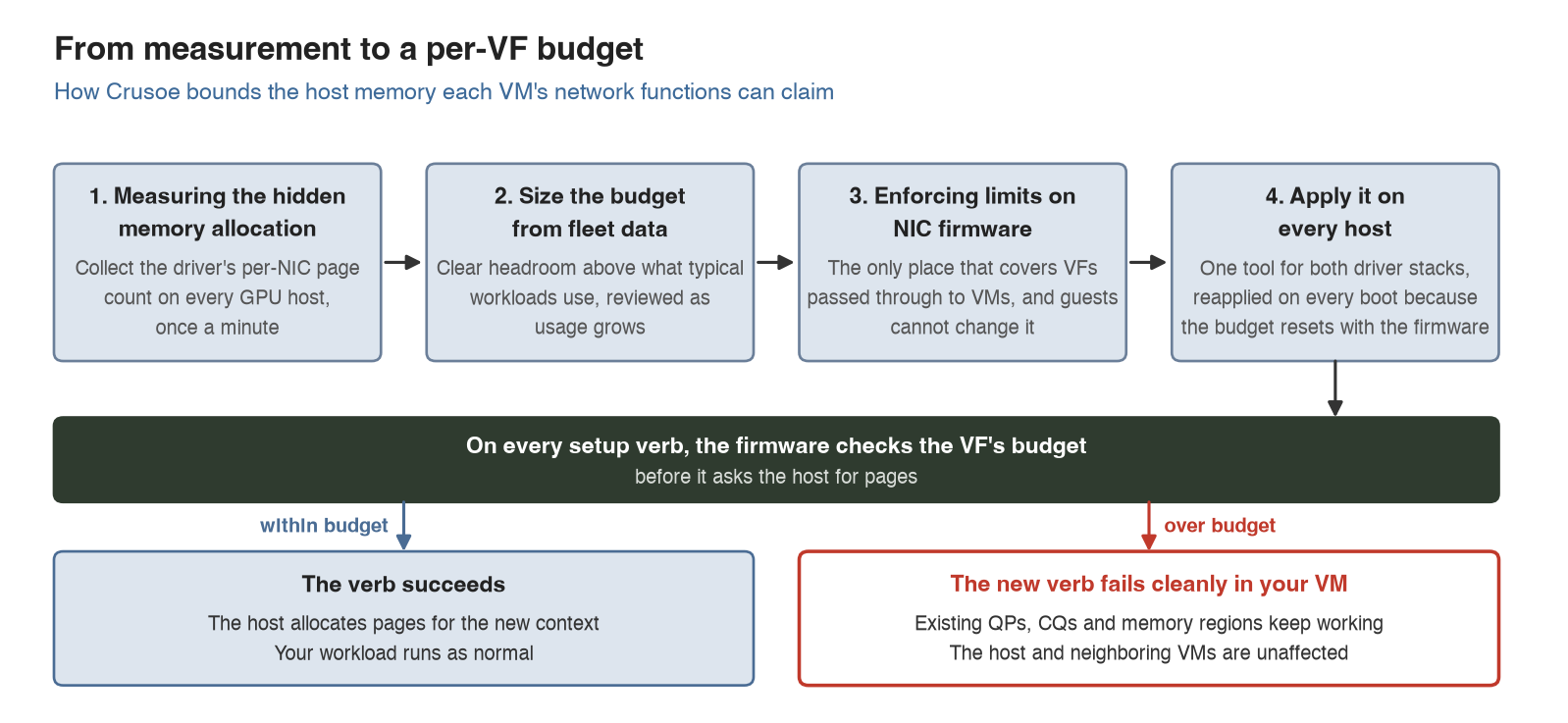
The host NIC driver places no limit of its own on these pages. It keeps allocating as long as the firmware asks. Left unbounded, one VM's registrations could take memory the host needs for itself and for the other VMs on the server. To prevent this behavior we had to establish some boundaries, first by measuring the memory usage, then deciding how much to allow, establishing a common pattern to enforce a limit and rolling the change to every host.
Measuring the hidden memory allocation
Standard host memory accounting does not show these pages. They come straight from the kernel's page allocator, so they never appear in slab statistics, and no process owns them.
The NIC driver does keep its own count. For each physical function (PF) it exposes, via debugfs, the number of 4 KiB pages it has handed to the firmware, including the pages given on behalf of that physical function's virtual functions (VFs).
/sys/kernel/debug/{driver name}/{pci address}/pages/fw_pages_totalWe added a small collector to every GPU host, on both our Ubuntu and Rocky Linux hosts. A systemd timer runs it once a minute. It reads the list of InfiniBand adapters on the host, reads the counter for each one, and writes the values as a Prometheus gauge for the node exporter's textfile collector. Each NIC becomes its own series, labeled with its PCI address, RDMA device name and physical slot, so a reading points straight at one adapter.
# HELP mlx_fw_pages Total number of firmware pages used by the mlx device.# TYPE mlx_fw_pages gaugemlx_fw_pages{nic="0000:00:00.0",ib_name="mlx",dmi_name="SLOT1",node_name="gpu-host-01"} 39316From a direct measurement perspective, this memory is still "hidden", however by collecting this counter and knowing the size of a page (4 KiB), we can use this information to track and monitor it across the fleet.
sum by (node_name) (mlx_fw_pages) * 4096From there we could see how much host memory each NIC held, how it moved as workloads ran, and which hosts held the most. That per-NIC and per-host view across the fleet is what the budget in the next step was sized from.
Size the budget from fleet data
Across the fleet, most workloads hold a modest amount of context memory per NIC, while a smaller group of RDMA-heavy workloads hold far more. We set the budget with clear headroom above the typical peak, so the large majority of workloads never come near it. The budget is a count of 4 KiB pages per VF, written in hexadecimal because that is how the firmware accepts the changes. Each GPU host has eight VFs, one per InfiniBand NIC, so the host-wide ceiling is eight times the per-VF value.
The examples below show how a hexadecimal value maps to a page count and a memory size. They illustrate the format and are not our budget values.
0x00020000 - 131,072 pages - 512 MiB0x00040000 - 262,144 pages - 1 GiBEnforcing limits on NIC firmware
The NIC firmware tracks context memory per function and accepts a budget for each VF, set by the host through the physical function. Crusoe sets a context memory budget for each VF in the ConnectX-7 firmware. The host applies it on every boot, and a guest cannot change it. The firmware checks the budget before it asks the host for pages, so the limit holds even though the VF is passed through to your VM.
Our GPU fleet runs multiple generations of the NVIDIA driver stack. On the newer versions (NVIDIA DOCA™ 3.2.x), setting the per-VF budget is supported directly, and the host can read the value back to confirm it. On the older versions (DOCA 2.9.x), the same functionality to apply the change at runtime was missing, and our initial understanding was that the budget could not be set at all on that version and changes would require not only VM restart to apply, but also backporting drivers to affected hosts.
Through significant engineering efforts we were able to discover a way to apply this change on 2.9.x as well, and we worked closely with NVIDIA to validate and review the approach and confirm it works. The 2.9.x stack still cannot report the per-VF value back, so the host keeps its own record of each successful write for the current boot.
This meant that for all DOCA versions a change could be applied at runtime and it only required a restart of a workload, not the VM, to take effect.
Apply it on every host
A single tool detects which stack a host runs and uses the matching method, so every GPU host follows the same procedure. The budget resets whenever the NIC firmware resets, so the host applies it again on every boot, as soon as the NIC's VFs exist. A running VM keeps the budget it started a workload with and picks up a new one when it restarts the workload.
With the budget in place:
- Within budget, setup verbs succeed and your workload runs as normal
- Over budget, the new verb fails cleanly inside your VM
- Existing queue pairs, completion queues and memory regions keep working, and the VM keeps running
- The host and neighboring VMs are unaffected
What hitting the budget looks like
When a VF reaches its budget, the next setup verb that needs more context memory fails. For RDMA-heavy workloads that is almost always a large memory registration. In our tests the failing call was a large GPU memory registration (40 GiB) through ibv_reg_dmabuf_mr which returned Resource temporarily unavailable.
ibv_reg_dmabuf_mr(address=0x7f7980000000, length=42949672960, access=0x10000f) failed: Resource temporarily unavailableThat message is the standard text for EAGAIN. Communication libraries built on verbs often wrap it in their own error message, for example Input/output error, and some report only that a registration or memory mapping failed. If you see one of those, look for the underlying verb failure in the library's debug output.
The failure stays inside the one VF that hit its budget:
- The failing call returns an error and changes nothing, and no memory is taken from the host
- Queue pairs, completion queues and memory regions created earlier keep working, so traffic already in flight continues
- The VM keeps running, and its other VFs, the host and neighboring VMs are unaffected
- Retrying the same call fails the same way until the workload releases objects or registers less
It is not a NIC hardware fault, a driver crash or a network problem. The link stays up and the device stays healthy. It means the workload asks for more context memory than its VF's budget allows, and the next section covers how to bring that down.
First, reduce what you register
Most workloads fit comfortably within the budget. When one does not, the quickest fix is usually on the registration side. Start by seeing what your workload actually holds while it runs.
# per-device object countsrdma resource show# memory regions with their lengths, and queue pairs and completion queuesrdma resource show mrrdma resource show qprdma resource show cq- Register only the GPU memory you move over RDMA. Translation cost scales with registered bytes, not with bytes transferred, so a large pool registered up front for convenience costs the same whether you use it or not.
- Register a buffer once and reuse the registration. Every registration gets its own translation table, so registering the same memory again, or in several protection domains, pays the cost again.
- Keep queue pairs and completion queue counts in proportion to what you need. Each one is a fixed-size context, and per-peer queue pairs add up quickly at scale.
- Deregister buffers and destroy objects you no longer use. The firmware returns pages to the host only when the objects behind them are gone.
If reducing registrations isn't enough
A small number of workloads need large registrations across every GPU and NIC and still reach the budget after the steps above. If yours is one of them, talk to Crusoe and share the following so the conversation starts with the right data:
- Your workload type and the communication libraries it uses
- How much GPU memory you register per GPU, and in how many registrations
rdma resource showoutput from inside the VM while the workload runs- Error logs showing the failing call and when it happened
Conclusion
RDMA memory registration consumes host memory. Neither the VM nor standard host memory accounting shows where it goes. A per-VF budget in the NIC keeps one VM's usage from spilling onto its neighbors.
Talk to our team about sizing your RDMA-heavy workloads on Crusoe Cloud.
Frequently
asked questions
Does RDMA memory registration use host memory in a virtual machine?
Yes, on an SR-IOV GPU server, RDMA memory registration inside a VM consumes memory on the host, outside the VM. Every registered buffer makes the network card store context, and because the card’s on-chip memory is tiny, that context lives in host RAM. The guest sees only a successful registration call, while the host sees free memory shrink with no owning process. The pages return only when the guest destroys the objects behind them.
How much host memory does RDMA memory registration use?
RDMA memory registration costs about 8 bytes of host memory for each mapped page of the registered buffer, so one registration at 4 KiB pages needs roughly 2 MiB per GiB, and at 2 MiB pages it needs 512 times less. That is the minimum for a single registration on a single NIC. A workload that registers the same GPU memory on several NICs pays it once per NIC, and queue pairs and completion queues add context of their own. Across Crusoe's fleet, most workloads stay under about 1 GiB per NIC, while RDMA-heavy workloads have reached between 4 and 6 GiB on a single NIC.
Why does RDMA memory registration fail with “Resource temporarily unavailable”?
On Crusoe GPU VMs with NVIDIA ConnectX-7 InfiniBand adapters, a registration call that fails with Resource temporarily unavailable usually means the VM’s virtual function has reached its context memory budget in the NIC firmware. The budget caps how much host memory each virtual function’s RDMA setup can consume, so the call fails cleanly inside the guest instead of starving the host. Existing connections keep working, and it is not a NIC, driver or network fault.
How do I reduce RDMA memory registration overhead?
Register only the GPU memory you move over RDMA, since translation cost scales with registered bytes rather than bytes transferred. Prefer a few large, physically contiguous buffers over many fragmented ones, because 4 KiB pages need 512 times more translation entries than 2 MiB pages. Keep queue pair and completion queue counts proportional to real need, and deregister buffers you no longer use.