Self-Serve Deployments: Predictable performance, without the infrastructure lift
Reserved inference capacity on Crusoe's optimized engine and managed infrastructure. Self-Serve Deployments give you predictable performance, dedicated throughput, and scale that grows with your workload.
.jpg)

.png)
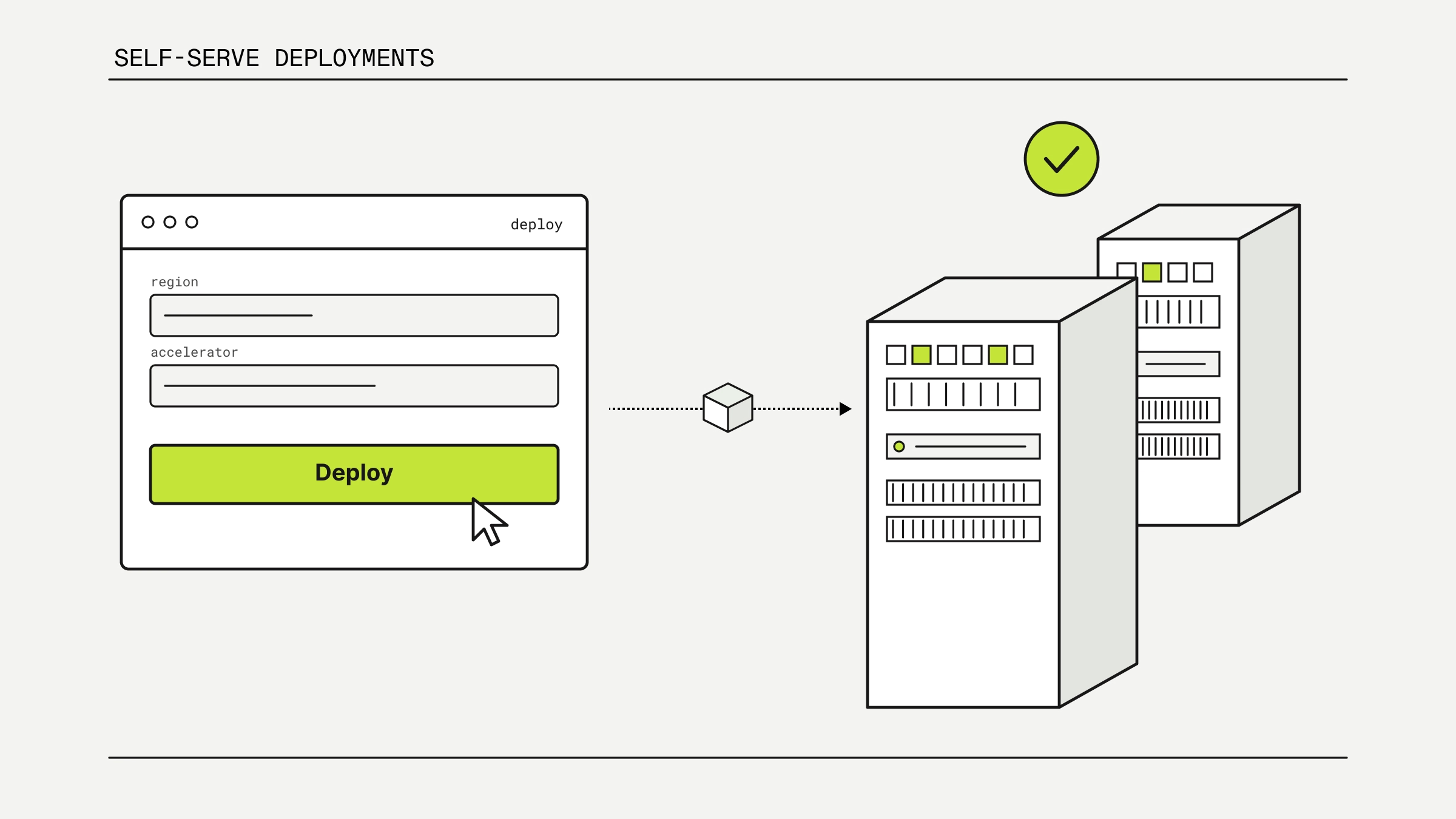
Most teams start building on serverless inference, and for good reason: you call an API, you pay per token, and you ship. It is the simplest way to get a model into production. But as an application finds traction, the shared, multi-tenant pool that made serverless easy can start to pose significant challenges. Noisy neighbors can affect your latency. Rate limits can create an unpredictable experience. Workload scalability becomes a pressing challenge.
Self-Serve Deployments give you reserved inference capacity with additional controls to help you build for scale. You get the benefit of a dedicated deployment to serve your inference workload without the toil of standing up and tuning an inference stack yourself.
Self-Serve Deployments are the right fit when you need:
- Predictability. You need consistent, reliable inference performance over time, not best-effort on a shared pool.
- Sustained traffic. You have high-volume, consistent workloads that benefit from a lower effective cost-per-token as you scale.
- Fine-tuned models. You want the ability to serve your own LoRA adapters trained through Crusoe's serverless fine-tuning offering.
- Control over scaling. You are looking to reduce the risk and impact of rate limiting by controlling the number of replicas behind your workload.
- Pay-per-use flexibility. You want to pay per GPU-hour and manage cost against actual usage.
Why we built Self-Serve Deployments
Until now, Crusoe Intelligence Foundry covered the bookends of the inference spectrum. Serverless Inference handles the "off the rack" case: zero setup, popular base models, ideal for testing and lower-volume production. At the other end, fully managed Tailored Deployments handle the bespoke case: deep, hands-on optimization for the most demanding workloads. With the addition of Self-Serve Deployments into Crusoe Intelligence Foundry, teams who are iterating and scaling their inference workloads now have a simplified path in between.
The middle ground between serverless and tailored deployments is where a growing number of teams actually live. They have outgrown serverless, but they do not want to take on running an inference engine. We often hear the feedback that achieving your target time to first token while managing your own open-source serving stack is doable. However, if a service is able to achieve the same performance and remove the burden of managing inference engines or compute for a user, companies can focus on differentiation and growth rather than infrastructure management.
Running inference well is its own discipline. Engine optimization requires deep knowledge of the underlying hardware and software. Supporting inference in production takes active engineering and on-call resourcing. Not to mention, the ecosystem moves constantly, which requires dedicated research efforts to understand and apply the latest innovations. For most teams, inference is one component of a larger product, and every hour spent tuning it is an hour not spent on what makes their product unique.
Self-Serve Deployments take a portion of the optimizations we developed for our most demanding customer workloads and package them into a scalable, self-service offering. You choose a model and a deployment configuration; Crusoe handles engine selection, tuning, and routing on managed infrastructure. The result is a streamlined path to performant, production-grade inference that is ready to meet your workload demands.
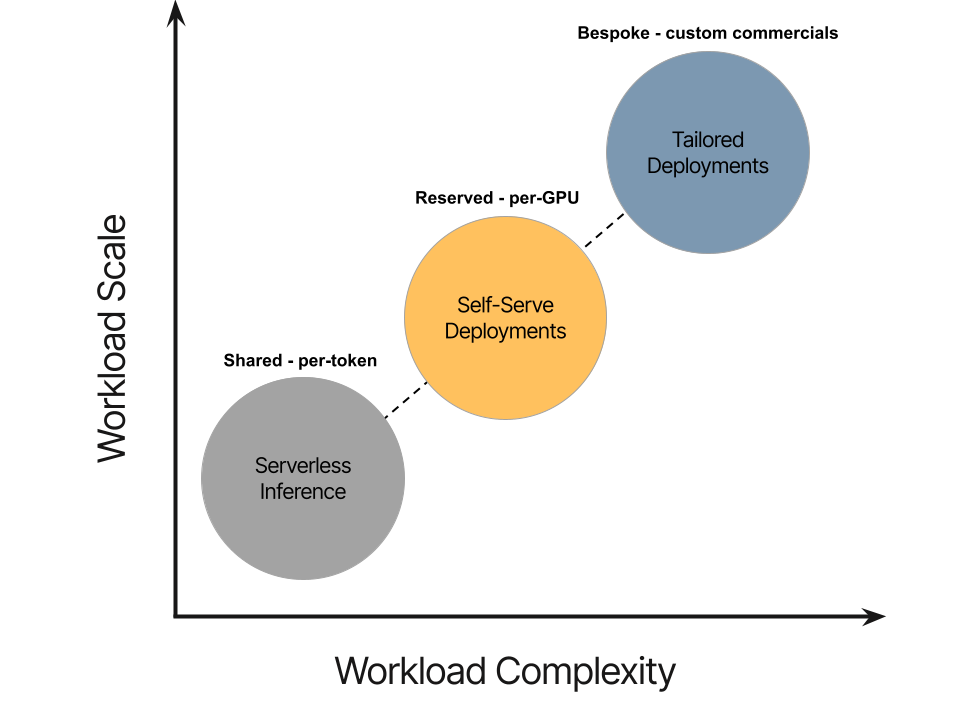
What self-serve brings to you
Self-Serve Deployments are built around a simple idea: give you the performance and control of a dedicated deployment, without the operational burden of running one. With Self-Serve Deployments, you get the following key capabilities:
- Dedicated capacity, no noisy neighbors. Your deployment runs on reserved capacity, so your traffic is never contending with other tenants for resources. Performance stays consistent and predictable, even under load.
- No shared rate limits. Throughput is bounded by the replicas behind your deployment, not by a shared multi-tenant pool. You control headroom by controlling replica count, so traffic spikes do not run you into someone else's ceiling.
- Configuration profiles, not hand-tuning. Rather than asking you to hand-tune an engine, each model offers named profiles optimized to meet your performance goals. For launch, we are focusing on optimization profiles that meet common goals for inference workloads.
- Support for your fine-tuned models. Self-Serve Deployments supports a broad set of base models, and allows you to deploy LoRA adapters trained through Crusoe's serverless fine-tuning offering for the same base model architectures.
- Pay per GPU-hour. Billing is time-based per GPU-hour rather than per token. At sustained high utilization, that flips the economics in your favor (see the worked example below).
The following table provides a high-level comparison of the Self-Serve Deployments and Serverless Inference offerings.
Additionally, self-serve supports the following base models. LoRA adapters trained on these base model architectures through Crusoe serverless fine-tuning are also supported.
Worked example: the economics of self-serve inference
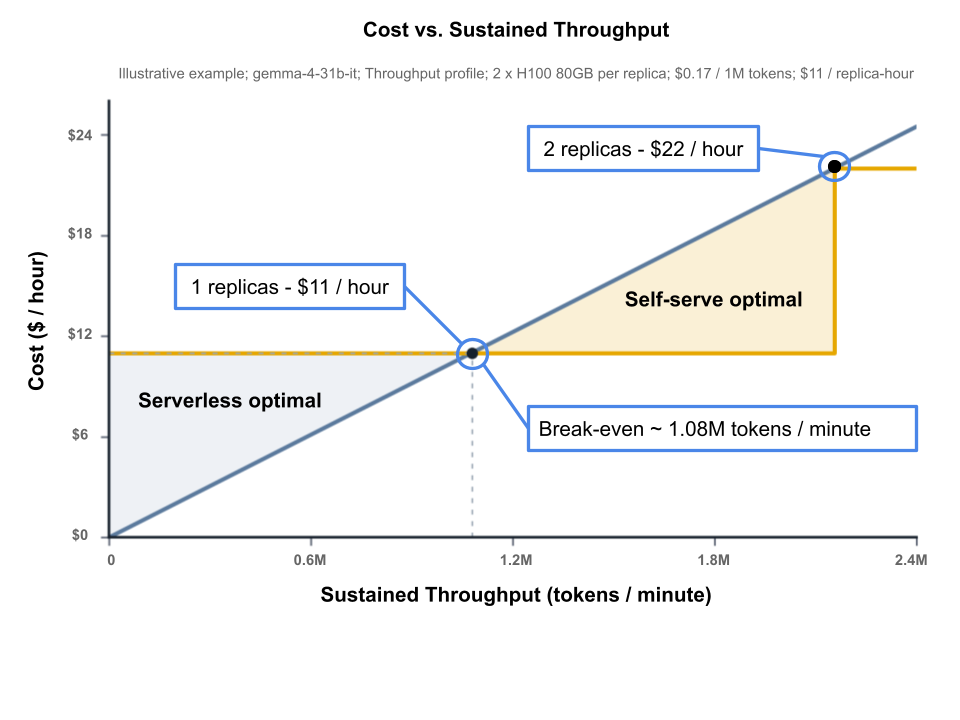
Serverless Inference bills per token while Self-Serve Deployments bills per GPU-hour. For every model, there is a break-even point based on token volume. Below some sustained volume, per-token serverless inference is cheaper, but above that threshold Self-Serve Deployments become the clear winner. The following example illustrates how to find that point for a given model.
Take gemma-4-31b-it on the Throughput profile as an example, deployed with one replica for a total of two NVIDIA HGX H100 80GB GPUs.
The break-even volume is simply the hourly cost of the deployment divided by the serverless per-token price: $11.00/hr ÷ $0.17 per 1M tokens ≈ 64.71M tokens/hour ≈ 1.08M tokens/minute ≈ 17.97K tokens/second.
In other words, if your workload sustains roughly 1 million tokens per minute or more on this deployment configuration, a Self-Serve Deployment costs less than paying per token on serverless inference. The token economics become even more favorable at higher throughput. Conversely, if your workload doesn't sustain 1 million tokens per minute, serverless inference remains the better option.
Two things are worth calling out here. First, each replica can sustain a finite amount of throughput, but your cost benefit scales linearly so additional replicas continue to provide favorable cost-per-token economics. Second, this example only compares cost. Self-Serve Deployments also includes benefits like dedicated capacity, no shared rate limits, and support for fine-tuned models, all of which factor into the decision of when to move from serverless inference to self-serve.
Worked example: optimization profile comparison
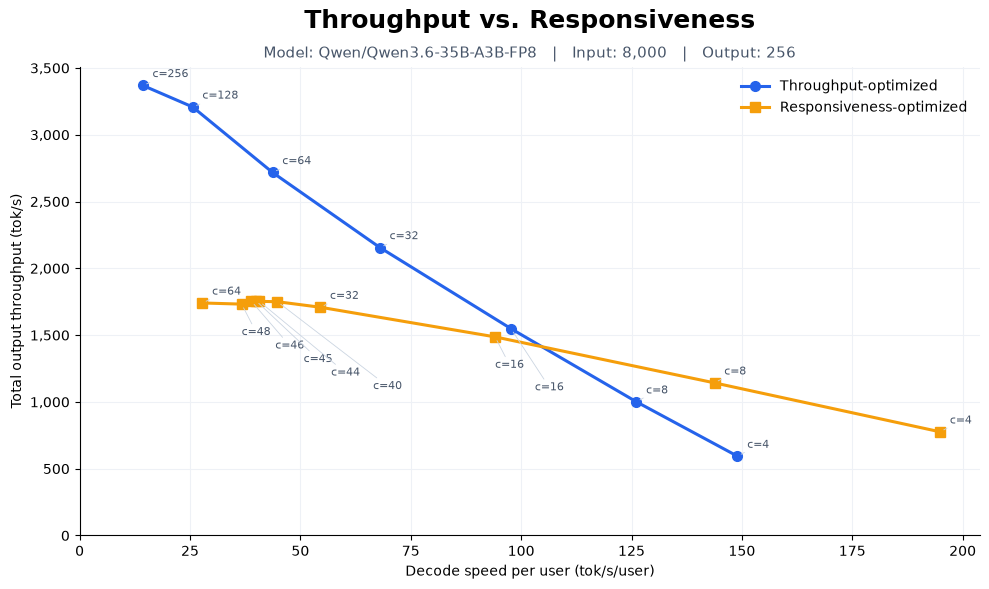
Every model on Self-Serve Deployments supports multiple optimization profiles, and the right one depends on whether you care more about token volume or speed. To provide a representative example, the following benchmark showcases two deployments of 4 x H100 80GB GPUs. One deployment is optimized using the throughput profile and the other deployment is optimized with the responsiveness profile. The chart below plots the trade-off between total output throughput and decode speed per user on qwen-3.6-35b for an 8k-input / 256-output represenative workload at different levels of concurrency. As the graph notes, packing more requests per replica increases the throughput per GPU but also decreases the decode speed per user. Overall, the graph shows the factors that need to be considered when optimizing around different profiles for a given workload.
The Throughput profile pushes the most tokens per GPU at 3,369 tok/s, which is what drives down cost per token for batch and high-volume work. However, this profile comes with a tradeoff on per-user decode speed as concurrency decreases. The decreased decode speed impacts the deployment’s ability to produce fast, snappy responses that interactive apps depend on.
Conversely, the Responsiveness profile gives up some peak output throughput (topping out around 1,759 tok/s) to sustain a much higher decode speed per user for a similar concurrency on the Throughput profile. For latency-sensitive traffic, that's the difference between a response that feels instant and one that drags.
The crossover is the key insight: once your target decode speed climbs above ~100 tok/s/user, the Responsiveness profile actually delivers more throughput than the Throughput profile, because the Throughput profile's per-user speed collapses in that regime. This highlights the importance of matching your deployment profile to your performance target. Throughput is ideal when you are maximizing volume at relaxed latency, while Responsiveness is most effective when per-user speed is the aim. Aligning the right profile for your deployment gets you a better experience and better token economics while helping you achieve your inference goals.
How to create a Self-Serve Deployment
- You can get a feel for Self-Serve Deployments by exploring the new Self-Serve homepage in the Crusoe Cloud console.
- Next, you’ll select a model for your deployment. You can choose from one of our supported base models or select a fine-tuned LoRA adapter based on the same model architecture.
- Crusoe's serverless fine-tuning offering trains LoRA adapters for top-tier models without managing any infrastructure. Fine-tuned model checkpoints share the same model registry and appear in the Self-Serve model selector once your checkpoint is ready. Learn more about how to use Crusoe Serverless Fine-Tuning here.
- Choose a deployment configuration. Select Responsiveness for latency-sensitive, interactive traffic, Throughput for high-volume, cost-sensitive workloads, or Balanced for general optimization across both. The recommended configuration and its hourly cost are shown before you deploy.
- Deploy. Name and launch your deployment. Crusoe provisions reserved capacity, selects the appropriate engine, and takes care of managing your deployment.
- Send traffic. Create an API key and call your deployment through our OpenAI-compatible API. Monitor usage and scale replica count as your traffic grows.
.gif)
Check out the example cURL script below to send your first inference request to your new self-serve deployment.
curl https://api.inference.crusoecloud.com/v1/chat/completions \
  --request 'POST' \
  --header 'Content-Type: application/json' \
  --header 'Accept: text/event-stream' \
  --header "Authorization: Bearer <API key>" \
  --data '{
    "model": "<deployment alias>",
    "messages": [
      {"role": "system", "content": "You are a helpful assistant."},
      {"role": "user", "content": "Summarize what managed inference is in one sentence."}
    ]
  }
Get started
See the Self-Serve Deployments quickstart to set up your first deployment, or fine-tune a model with Serverless Fine-Tuning and deploy it onto a self-serve deployment. Need optimization beyond the standard deployment configuration? Contact us to learn more about Tailored Deployments. For an overview of all Crusoe inference options, visit the Managed Inference overview.