Customer-Managed Keys for AWS KMS on Crusoe Cloud
With CMEK for AWS KMS, your encryption key stays in your AWS account. Crusoe gets scoped, revocable access, never the key itself.



As more AI and infrastructure workloads move into production on Crusoe Cloud, security and compliance teams are asking sharper questions about how their data is protected: who holds the encryption keys, who can use them, and how quickly access can be revoked at their discretion.
Crusoe Cloud already encrypts data at rest by default. Today, we're adding another layer of control with Customer-Managed Keys for encryption (CMEK) for AWS KMS. With CMEK, you bring and manage your own key in your AWS account, and Crusoe uses it (under permissions you control) to encrypt and decrypt data keys that protect your data.
Why enterprise teams want direct key control
Platform-managed encryption is a solid default, and it's enough for most workloads. But regulated and security-conscious organizations often need more: keys that live in their own cloud account, a clean separation between who processes the data and who owns the keys, and the ability to revoke access immediately without waiting on a vendor support workflow.
CMEK is built for those teams. You keep the fully managed experience of Crusoe Cloud, while the master key protecting your data stays in your AWS KMS, under your policies.
How it works
CMEK is built around a single IAM role that you create and control in your AWS account. That role does two things:
- It trusts Crusoe's
CrusoeCmekrole to assume it, scoped to your Crusoe project id as the ExternalId — this is what keeps one customer's access isolated from another's. - It grants permission to call
kms:Encrypt,kms:Decrypt,kms:GenerateDataKey, andkms:ReEncrypt*on the specific KMS key you want Crusoe to use. Today, CMEK only callsEncryptandDecrypt; the rest are reserved for capabilities we're building next, like key replacement.
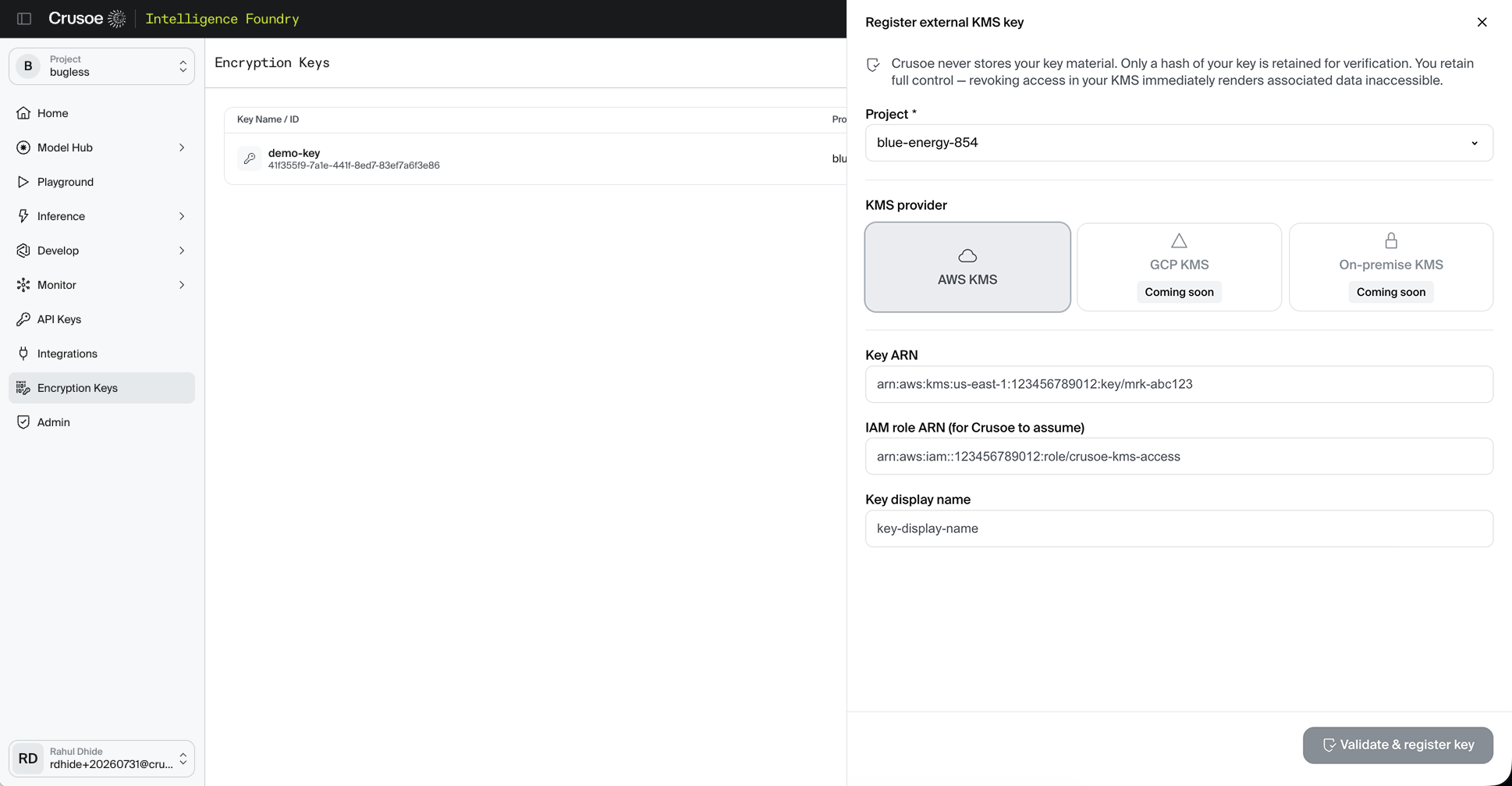
You hand the role's ARN and the key's ARN back to Crusoe through the console. Before activating the registration, Crusoe assumes your role and performs a no-op encrypt/decrypt round trip against the key. If the trust policy, ExternalId, or permissions don't line up, registration is rejected with a specific reason so you can fix it and retry. Nothing gets activated until that check passes.
Your master key never leaves your AWS account. Crusoe never possesses it — only temporary, scoped permission to call it.
What this gives security teams
Segregation of duties. Crusoe processes and stores your data; you hold the key in your own KMS. That's a clean boundary compliance teams can point to when mapping controls to frameworks like SOC 2, HIPAA, or PCI-DSS.
Direct, instant revocability. If you need to cut off access for a suspected breach, an offboarding, or a legal hold, you delete the IAM role or detach its KMS policy on your side, in your own AWS account. The effect is immediate: Crusoe can no longer decrypt your data until access is restored. This doesn't touch or move your underlying data; it only changes whether Crusoe can reach the key that protects it.
An audit trail inside the infrastructure you already run. Every CMEK call assumes your IAM role and calls your KMS key, so it shows up in your own AWS CloudTrail alongside everything else your team already monitors. Each call's STS session name is cmek-<crusoe-project-id>, so you can attribute usage back to the specific Crusoe project that made it.
Getting started
Setup is a one-time, three-step process, and you can do it from the AWS Console or the AWS CLI:
- Create (or pick) a KMS key. A symmetric key with Encrypt/Decrypt usage, in the region of your choice.
- Create an IAM role that trusts
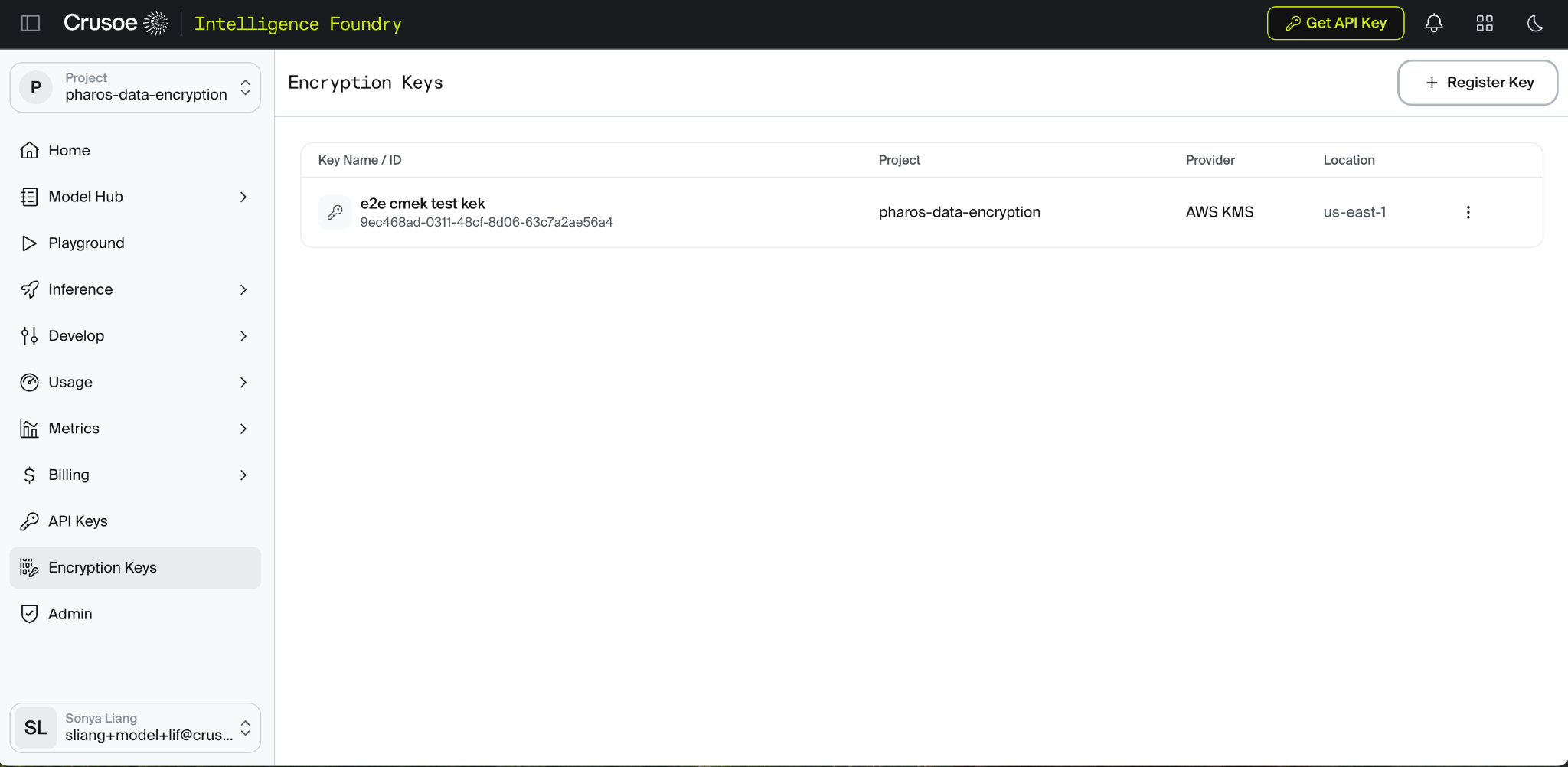
CrusoeCmek. Attach a trust policy scoped to your Crusoe project id, and an inline policy granting the required KMS actions on your key. - Register the key with Crusoe. In the Crusoe portal, go to Settings → CMEK → Add External Key → AWS KMS, and provide the key ARN and role ARN. Crusoe validates the setup with a round trip against your key before activating it.
This follows the standard envelope encryption pattern: Crusoe encrypts your data with a data key, and uses your KMS key only to encrypt and decrypt that data key — never the bulk data itself. That's why the role only needs Encrypt and Decrypt on your key.
Rotating the underlying KMS key requires no action on your part — AWS embeds the key version in the ciphertext, so Crusoe transparently follows the rotation. And the CrusoeCmek role ARN itself is intentionally stable; if we ever need to change it, we'll give at least 90 days' notice.
CMEK for AWS KMS is available now. If you're setting it up or want to talk through how it fits your compliance requirements, reach out to your Crusoe account team.